An EHS software quote can look simple until you compare what each price actually includes. One provider may quote a monthly subscription, while another includes rollout support, data migration, training, or a broader set of modules.
The cost of EHS software includes the full cost of buying, setting up, and using the system. That includes the subscription, but it can also include migration, integrations, training, support, and the time your team spends getting the new process in place. A useful budget separates those costs before you choose a provider.
By the end of this guide, you will be able to compare pricing models, identify costs that may sit outside the quote, and build a three-year budget for EHS software that fits the way your team works.
Key Takeaways
- EHS software cost includes the subscription, setup, data migration, training, integrations, support, and the time your team spends on rollout.
- EHS vendors commonly price software per named user, per employee, by company size, as a flat plan, or through a custom quote.
- Per-user pricing can lower the starting price, but it may limit access for employees who need to report hazards or complete inspections.
- Per-employee or size-based pricing can make wider access easier to budget for, especially when safety work involves the whole workforce.
- A custom EHS software quote should clearly list the people, sites, modules, migration work, support, and contract terms it covers.
- The lowest monthly price is not always the lowest first-year cost because rollout, migration, training, and optional modules may cost extra.
- To compare EHS software prices fairly, ask each provider to price the same workforce size, sites, modules, migration, training, support, and contract term, then compare the three-year total.
- An EHS software test should use a real inspection form, incident record, corrective action, and report to confirm that the system fits the team's workflow.
How Much Does EHS Software Cost?
EHS software can cost anything from a low monthly fee for a small team to a custom agreement for a large, multi-site business. The price depends on more than the number of people on payroll. It also reflects who needs access, which modules are included, how much data must move from the old system, and how much help the provider gives during rollout.
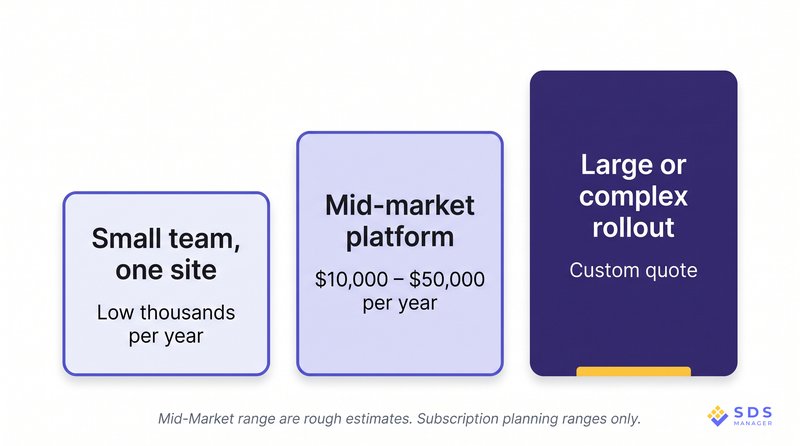
Public EHS pricing is limited and is not consistent enough to produce a reliable market average. As a rough starting point, a simple small-team subscription may start in the low thousands per year, while mid-market platforms typically range from $10,000 to $50,000 per year. Larger or more complex deployments are often quote-based. Treat those figures as subscription planning ranges, not all-in first-year costs or a promise of what a provider will quote.
For one site, a simple setup may cover incident reporting, inspections, risk assessments, and corrective actions. As the business adds locations, local requirements, training records, document control, integrations, or a wider group of users, the scope grows with it. Each added requirement can change the price.
As a result, the lowest monthly figure does not tell you what EHS software will actually cost. A plan may look affordable until you add migration, training, extra tools, or access for the people who need to report hazards and complete safety work.
Focus on the total cost of the system you will use, not the starting price shown on a provider's website. Your workforce, sites, and rollout complexity give you a clearer basis for comparing prices.
What EHS Software Costs by Company Size
Company size is only part of the price. The number of sites, the people who need access, and the amount of rollout work can have just as much effect. Two businesses with the same workforce can therefore receive very different quotes.
The table turns those factors into typical size-and-site profiles. Its ranges cover subscriptions only, not one-time setup, migration, training, or integration work. Public pricing is too limited to give a dependable range for the last profile, so that row states the limit plainly.
| Typical size-and-site profile | Rough annual subscription range |
|---|---|
| Under 50 employees, 1 site | About $1,000–$6,000 |
| 50–500 employees, 1–5 sites | About $10,000–$50,000 |
| More than 500 employees, or a business of any size with many sites or complex rollout needs | Custom quote; no reliable public range |
Under 50 Employees at One Site
For a business with under 50 employees at one site, a rough annual subscription range is about $1,000–$6,000. Smaller businesses often need a system that is easy to set up and simple to manage. The priority is usually to replace paper forms, spreadsheets, and scattered files with a reliable way to report incidents, complete inspections, record risks, and assign follow-up work.
Teams moving from paper often need incident reporting software that supports the people reporting issues as well as the people reviewing them. A low monthly price can make sense at this stage, but check what it includes. Ask whether all employees can report a hazard, whether mobile use costs extra, and whether the tools you need are part of the plan.
50 to 500 Employees Across One to Five Sites
For a business with 50–500 employees across one to five sites, a rough annual subscription range is about $10,000–$50,000. At this point, EHS software often becomes a shared budget decision. Safety, operations, finance, and sometimes IT may all need to review it. The business may also have more than one site, a larger group of managers, and more records to move from the old process.
At this scale, the subscription is only the starting point. Compare the cost of migration, training, reporting, integrations, support, and access for the people who complete inspections or report issues. Confirm where the provider's published pricing ends and what changes when you pass that point. Pricing or contract terms may change once your business reaches that limit.
More Than 500 Employees: One Site or Multiple Sites
For more than 500 employees, public pricing is not detailed enough to give a reliable annual range, so a custom quote is the more honest expectation. That does not automatically make the business enterprise or require an enterprise agreement.
A single-site business with standard workflows may still have a relatively simple scope. A custom quote becomes more likely when the rollout also includes several sites, different user roles, data migration, reporting needs, security review, integrations, or support for a phased launch.
Before comparing providers, request an itemised scope. It should show what is included, what requires extra work, and how renewal pricing may change.
Also confirm how you can export your records if you leave. A system is easier to budget for when you understand both the cost of starting and the cost of changing later.
Those requirements also shape the way providers price the system.
The Four Ways EHS Software Is Priced
Vendors can charge for similar EHS modules in very different ways. The model affects the monthly bill, but it also affects who can use the system and what you will pay as the business grows.
Per user, per month: Teams with a small, defined group of full-access users often pay this way. That group may include safety managers, supervisors, and administrators. You pay for each named login, so the bill follows the number of accounts rather than the full workforce.
Per user, per month suits a small safety team, but ask whether other employees can report hazards or complete forms without a paid login. If many people need full access, the cost rises as each new account is added.
Per employee, or by size range: Businesses where most of the workforce reports hazards, completes inspections, or follows up on actions often see this pricing. You pay by headcount, not by login, so wide access is easier to budget for.
For example, EHS Solutions Standard tier starts at $9.99 per employee per month for teams of up to 200 employees. On the other hand, EHS Insight publishes pricing from $5,000 per year for small and mid-sized organizations, with its price based on employee count, selected modules, and implementation needs.
These published figures are not directly comparable because the included scope differs. Before you compare plans, ask how the provider counts part-time staff, seasonal workers, and contractors.
Flat monthly or tiered plans: These plans can be easier to budget for when your workforce and site count are stable. You pay one set amount for the plan or size range. Before choosing one, check how many users, sites, and tools it includes, and whether mobile access or support costs more.
Custom quote, priced for your setup: Businesses with several sites in multiple countries or continents with different local requirements, complex data migration, or integration needs usually receive a custom quote.
Think of a manufacturer with plants in Germany, Mexico, and Vietnam, each filing under a different regulatory regime; a construction firm running job sites across the Gulf states; or a healthcare group whose hospitals in three countries each keep their own chemical inventory in a separate legacy system.
These businesses may need different local workflows, complex legacy-data migration, or connections between EHS records and HR or ERP systems. The provider builds a price around the workforce, sites, tools, support needs, and rollout plan.
This is common when the work cannot be covered by a standard plan. It also makes direct comparison harder, because one quote may include migration and reporting help while another only covers the subscription. The best model depends on how safety work happens in your business. Price is only one part of choosing the best EHS software for your business.
Compare access, included modules, rollout support, and the total cost over time. A cheaper per-user plan may suit a small specialist team. It may cost more in practice if it limits reporting or forces you to add paid users later. That is why the quote needs more than a monthly number: it needs a clear list of what is included.
The Costs That Don't Show Up in the Quote
The subscription is only one part of the first-year cost. A provider may show a clear monthly price, then charge separately for the work needed to make the system useful to your team. Ask about each cost before you compare quotes.
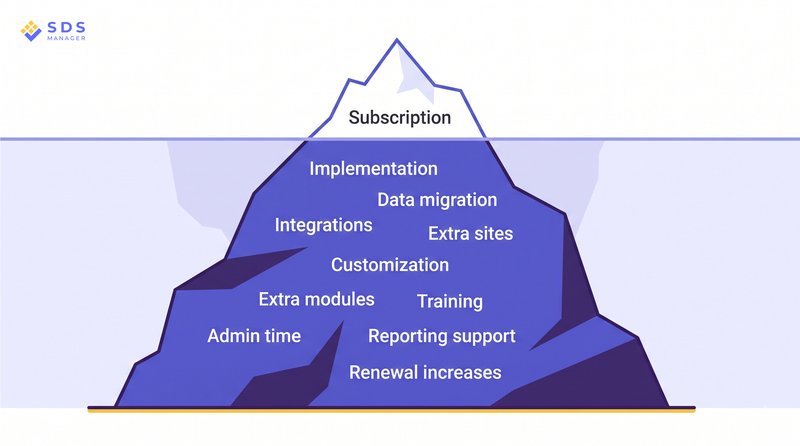
- Implementation and setup: Find out what the provider will set up and what your team must do. This can include user roles, approval steps, forms, notifications, dashboards, and reporting.
For planning, a basic rollout can take roughly 5–15 working days and may be included in the subscription or cost up to about $5,000 in provider services. A configured, multi-site rollout can take 15–60 or more working days and may cost $5,000–$25,000 or more.
These are illustrative planning ranges, not published market averages: vendors rarely publish comparable implementation scopes. A setup fee may be reasonable when the work is clear. It is harder to budget for when the scope is vague. - Data migration from your old system: Moving records can take time even when the provider does the technical work.
A small, clean set of spreadsheets may take roughly 2–10 working days and be included or cost up to about $5,000. Several legacy systems, old attachments, or data that needs cleaning can take 10–30 or more working days and may cost $5,000–$25,000 or more. These are also planning ranges, not a standard public price.
Your team may still need to remove duplicate records, fill in missing information, check old attachments, and confirm that important data arrived correctly. Ask which records will move, who checks them, and what happens to information that cannot be transferred. - Integrations with HR, ERP, and payroll: Integrations can reduce repetitive data entry but may involve a one-time setup cost and ongoing maintenance. Confirm which systems can connect, what data will move between them, and who pays if either system changes later.
- Sites and locations: A provider may price by site, include a limited number of locations in a plan, or require a custom scope as sites are added. Ask whether temporary locations, warehouses, contractors, or regional offices count as separate sites, and whether each site needs its own configuration, reporting, or training.
- Customization and change requests: A configurable system lets an administrator change settings, fields, alerts, or approval steps. Custom development means the provider must build something new. Those are different types of work, and they are not priced as if they are the same.
Some vendors include configuration in the subscription but bill code changes by the hour, with the time and cost set after the request is scoped. Ask which changes your own team can make and which require paid developer time. - Modules that are not in the base quote: A quote may cover the immediate need but leave out modules you will need once the system is in regular use. Check the cost of inspections, incident reporting, risk records, corrective actions, mobile access, analytics, and reporting as one connected scope. Confirm exactly what each provider includes.
- Training and internal admin time: The provider may include training, but your team still needs time to learn the system, explain new processes, manage access, maintain forms, and follow up on overdue work. Include that time in the first-year budget.
- Who builds your regulatory reports?: Some systems let your team build reports. Others provide reporting help as a service. Teams responsible for OSHA recordkeeping should also confirm who prepares the required records, how quickly they are available, and what support is included.
- Renewal increases: Ask how the provider sets renewal prices. You need to know whether the price can rise, whether increases are capped, and whether adding users, sites, or modules changes the agreement.
- Lock-in, exit fees, and who owns your data: A system is not fully priced until you know what happens if you leave. Confirm what you can export, the format of the export, any export fee, how long records are kept, and whether the provider will support a move to another system.
These costs do not make one provider expensive by themselves. They show why a budget needs to cover the full rollout, not just the subscription. That full scope becomes the basis for a practical buying process.
How to Budget for EHS Software in Six Steps
A useful budget starts with the work your team needs to do. Once that is clear, you can give providers the context they need to recommend and price a suitable scope.
Step 1: Count the People Who Genuinely Need Access
Start with the people who will use the system, not just the people who manage it. That may include employees who report hazards, supervisors who complete inspections, managers who approve actions, and administrators who manage forms and reports.
List each group and what they need to do. This helps you see whether a per-user model will work or whether wider access makes more sense. The aim is not to buy as few logins as possible. It is to make sure the people who need to report an issue or complete safety work can do so.
Step 2: Separate Required Modules From Modules You Can Add Later
Make a list of the work the system must support when you launch. For many teams, this includes incident reporting, inspections, risk assessments, corrective actions, documents, and reporting.
Then divide the list into three groups:
- Needed at launch
- Likely needed within 18 months
- Useful, but not needed at launch
This gives providers a clear view of your immediate needs and likely next steps. It also helps you compare proposals that include different modules or rollout plans.
Step 3: Ask Every Vendor to Quote the Same Scope
Give every provider the same written description of your needs. Include your workforce size, number of sites, required modules, data migration needs, integrations, training, support, and expected growth.
Ask each provider to show:
- Annual subscription cost
- One-time setup and migration costs
- Training and support costs
- Included and optional modules
- Contract length and renewal terms
- Three-year total cost
Comparing the same scope gives you a clear basis for choosing between a per-user plan, a workforce-wide plan, a tiered plan, and a custom quote. A simple measure can help: calculate the annual all-in cost per employee over three years.
Step 4: Add Setup, Migration, and Training to Year One
The first year is usually different from later years because implementing EHS software moves the business from an old process to a new one. Include provider charges for setup, data migration, training, and integrations. Also include the time your own team will spend preparing data, testing forms, learning the system, and helping other users.
This is where the full first-year budget becomes clearer. A higher first-year cost may reflect more hands-on rollout support, migration work, or training that helps the team use the system well.
Step 5: Model Three Years, Not One
Because those early costs do not repeat every year, a one-year quote does not show the full cost of a system. Build a simple three-year model that includes the subscription, one-time costs, expected growth, optional tools, and renewal terms.
Use the same categories for every provider. If one option is billed monthly and another uses an annual agreement, show that difference clearly
For example, a $1,000 monthly subscription totals $12,000 over a full year. An annual agreement at $10,800 is a genuine saving only if it includes the same modules, users, sites, support, and renewal terms. That comparison stops a lower price from hiding a smaller scope. .
The result will not predict every future cost, but it will show how the available options fit your budget and plans.
A simple worksheet you can duplicate and use can help you plan for how the costs build up for each proposal. The worksheet makes one-time costs visible in the first year and makes later changes easier to plan for.
The annual all-in cost per employee is calculated by:
(Year 1 total + Year 2 total + Year 3 total) / 3 / average employee count
For example, a three-year total of $36,000 for a business averaging 100 employees equals $120 per employee per year. A per-user plan should also be measured per paid user: divide the same three-year total by three and then by the average number of paid accounts. Together, the two figures show the company-wide budget and the cost of the licensed access model.
Step 6: Test the Real Product With Your Own Data
A demo introduces the system. A practical test adds context by showing how it handles the forms, records, and reports your team uses. Many EHS providers such as EHS Solutions by SDS Manager offers a free trial, guided trial, or pilot, which gives you a practical way to test that fit. Check the terms carefully, though: trials may limit users, modules, support, or data migration.
Start with a real inspection form, incident record, corrective action, or report. Then ask to see how the workflow moves from a completed checklist to an assigned follow-up action and a report for management review.
The test can confirm whether users can complete the work, whether managers can find the result, and whether follow-up remains connected to the original record. By the end of these six steps, you should have a clear picture of what each option will cost to buy, roll out, and use.
Is EHS Software Worth the Cost?
EHS software is worth the cost when it makes routine safety work easier to complete, easier to follow up, and easier to review. The value does not come from the subscription alone. It comes from how well the system supports the work your team already has to do.
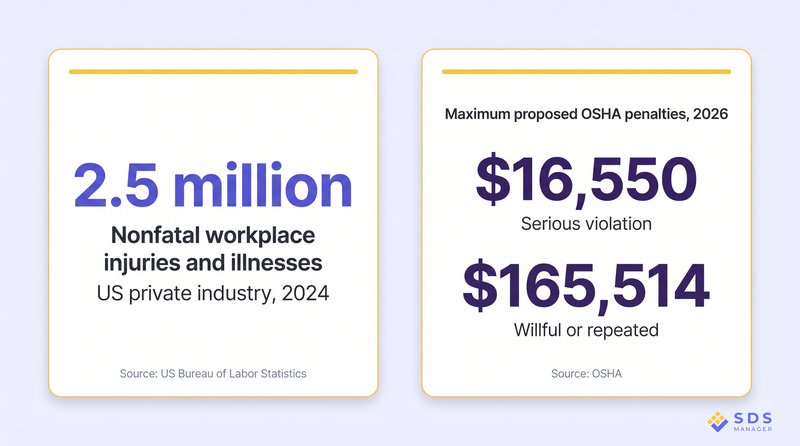
Workplace accidents resulting from workplaces may result in injuries and deaths worldwide. According to the U.S. Bureau of Labor Statistics, 2.5 million nonfatal workplace injuries and illnesses in private industry in 2024, or 2.3 total recordable cases per 100 full-time equivalent workers.
Compliance can also carry financial consequences: in 2026, OSHA can propose penalties of up to $16,550 for a serious violation and up to $165,514 for a willful or repeated violation; failure to abate can reach $16,550 per day.
Those figures explain why safety work needs consistent follow-up, but they do not prove that software will prevent an injury or avoid a penalty. Penalties depend on the facts, severity, employer size, and other factors. The practical question is whether the system improves the daily work that your team already needs to complete.
Start by tracing the process you use today. Your team may enter the same information into forms, spreadsheets, email threads, and reports. They may also spend time looking for past records, chasing overdue actions, or combining information from several sites before a review. Beyond the staff time involved, that fragmented work can make it harder to see what needs attention.
Once those gaps are clear, assess whether a connected EHS software platform can reduce them. For example, an incident can lead to an investigation, a corrective action, a risk review, or a new inspection without the team recreating the same details each time. That connection matters most when several people or locations are involved.
To assess the value for your business, use your own records:
- Estimate the time spent each month on reporting, inspections, follow-up actions, and manual reports.
- Identify where information is entered more than once or kept in separate places.
- Note how long it takes to find the records needed for a management review, customer request, or audit.
- Compare those costs with the three-year software budget you prepared earlier.
This approach does not require a dramatic savings claim to be useful. It gives you a practical way to decide whether the system will improve the safety work your team carries out every day. Once you know that, you can judge what a fair EHS software cost looks like for your situation.
What Value Should You Get from EHS Software
Price is the easiest thing to compare, which is why most vendor calls start there. The more useful question is what the system takes off your plate each week, and what it lets you prove when an inspector, an auditor, or a worker asks.
You cannot test that on a demo call. The only thing you have to judge it by before you buy is the quote the vendor sends back, and how specific that document is tells you how carefully they read your operation. A proposal that gives you a per-user rate and nothing else leaves you guessing about who can log an incident, whether audit tracking sits in the base plan, and what a second site does to the number.
So the proposal should answer five questions:
- What does the recurring price include?
- Which people can use the system, and what can they do?
- Which tools are included at launch and available later?
- What help is included for setup, migration, training, and ongoing support?
- What changes when the business adds employees, sites, or new requirements?
If a proposal cannot answer those questions, it does not yet show what the system will actually cost you. A clear scope gives finance, operations, and the safety team a budget they can all understand.
The goal is not to find the cheapest quote. It is to end up with one you can hand to finance, walk through line by line, and still stand behind twelve months from now when a site gets added. That starts with a vendor willing to be specific before you commit, which you can check in a minute at EHS Solutions by SDS Manager.
Frequently Asked Questions
Is There Any Free EHS Software?
No, there is no truly free EHS Software. However, some providers offer free EHS plans or free modules for basic safety work. These can suit simple checklists, forms, or small teams. Free options may not include the connected work a growing business needs, such as incident reporting, risk records, inspections, corrective actions, reporting, training, and support.
Do EHS Software Vendors Charge a Setup Fee?
Yes, some EHS software vendors charge a setup fee, while others include setup in the subscription. EHS Solutions by SDS Manager, however sets up your system free of charge. For most other vendors, ask whether the price includes configuration, data migration, training, integrations, and ongoing support. Each can be priced differently.
Can You Negotiate EHS Software Pricing?
Yes, you can often negotiate EHS software pricing. A provider may be able to adjust the scope, rollout plan, support level, contract length, or timing of the purchase. The most useful discussion is about the full cost and the support your team needs, not only the first subscription price.
How Long Does It Take to Implement EHS Software?
It can take from 2 weeks to about a year to implement most EHS software, depending on the vendor and the requirements. The timeline depends on the number of sites, the condition of existing records, required integrations, workflows, and training needs. EHS Solutions by SDS Manager provides complete implementation within one to four weeks.
Can EHS Software Replace a Safety Consultant?
No, EHS software cannot replace a safety consultant. The software helps teams manage repeatable daily processes, records, follow-up actions, and reporting. A consultant can provide specialist advice, audits, training, or support for a specific project.
How Much Does EHS Software Cost Per Employee Per Month?
EHS software cost per employee per month varies by provider and pricing model. Some vendors charge per named user, some charge per employee or size range, some use flat plans, and many provide custom quotes for larger or more complex businesses. EHS Solutions by SDS Manager charges $9.99 per employee per month.
What's the Difference Between EHS, HSE, and QHSE Software?
EHS, HSE, and QHSE software cover similar safety and compliance work. EHS means environmental, health, and safety. HSE uses the same three areas in a different order. QHSE adds quality. The most important question is whether the software supports the work your team needs to manage.

Arysha Alif Khan

Arysha Alif Khan is an EHS and chemical safety specialist with a background in biochemistry, biotechnology, and public health. She works closely with the product and regulatory teams to turn complex chemical regulations, SDS requirements, and workplace safety standards into clear, practical guidance for people.