![How to Implement EHS Software [A 7-Step Guide]](https://cms.sdsmanager.com/media/images/How_to_Implement_EHS_Software_A_7.2e16d0ba.fill-1200x675.png)
Rolling out EHS software depends less on which tool you pick and more on how carefully you set it up. Two companies can buy the same platform and get very different results. Success comes down to preparation, not just features.
This guide walks through the seven steps that make up a successful rollout, from your first needs assessment to long-term monitoring after launch.
Each step builds on the last, so getting the early ones right, especially your needs assessment and data prep, makes everything after easier. Rush them, and you spend the next year fixing problems you could have avoided.
The steps apply to any rollout. They work whether you are an EHS manager, a safety or compliance lead, or the IT or project lead on the job.
Key Takeaways
- To implement EHS software, first assess your processes, sites, and compliance duties. Then set clear goals and note your current numbers.
- After the initial assessment, build a small, cross-functional team that covers compliance, IT, and frontline work: an executive sponsor, an EHS lead, IT, and frontline reps. Then choose a single-phase or phased rollout.
- Configure the system to fit your workflows. Avoid over-configuration, which makes upgrades and upkeep harder.
- Map integrations with your current tools early. They affect data security, access, and how systems share data.
- Clean your data before you migrate it. Move only accurate, required records, and keep compliance records as long as the law demands.
- Pilot with one team using real data. Test under everyday conditions, then launch at once or in phases.
- After launch, track adoption and gather feedback. Keep a change log and name clear owners to govern the system.
What Does Implementing EHS Software Involve?
Implementing EHS software means consolidating your environmental, health, and safety work into a single system and getting your team to use it. It runs through seven steps, whether you are rolling out across many sites or working out how to implement EHS compliance software for a single facility.
Before those seven steps begin, put four things in place:
- Leadership behind the project. Without it, budget and priority disappear the moment a competing project comes up.
- A rough budget. Configuration, migration, and training almost always cost more than the subscription alone, so you need room to cover them.
- Someone clearly in charge. Without one owner, decisions stall between departments and the project loses momentum.
- An EHS platform that fits what you need. The steps that follow (configuring, migrating data, building a team plan) all depend on knowing which system you are implementing.
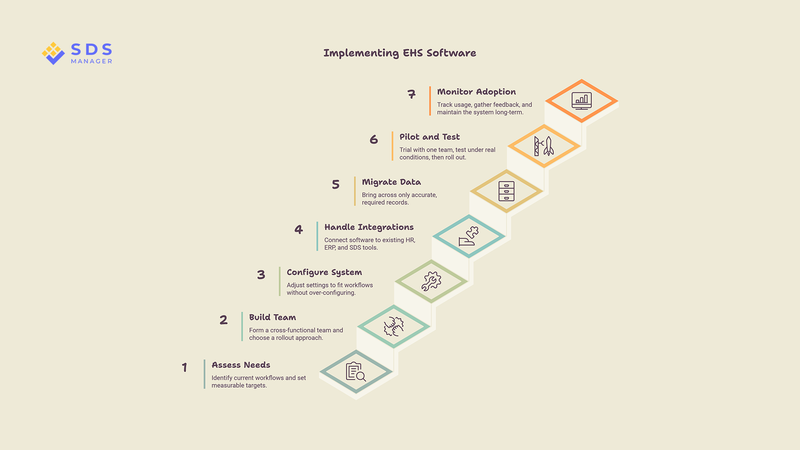
How to Implement EHS Software in 7 Steps
There are seven steps to implement EHS software, and here’s how to implement them:
Step 1: Assess Your Needs and Set Your Goals
Start by getting a clear picture of how you work now. Then turn what you find into goals you can measure.
With those in place, look closely at where you are today.
Map Your Current Workflow
List every site and the tools or spreadsheets each one uses. Note the regulations that apply to you, and list who handles reporting and daily safety tasks. This shows you what the new system has to replace, and where the gaps are.
Set Clear, Measurable Goals
Pick two or three outcomes that matter, such as faster incident reporting or fewer missed audits. Write down your current numbers for each one now, so you have a baseline to measure against later. Clear targets also keep the project focused.
Skipping this step is the most common cause of scope creep. Without agreed goals, every team keeps adding requests, and the project grows in cost and length.
Step 2: Build Your Team and Choose a Rollout Approach
Now that you have set your goals, you need to put together a cross-functional team before the project starts for rolling out.
EHS software touches compliance rules, daily frontline work, IT systems, and budgets, and no single department sees all of that clearly on its own. A team that spans these areas catches conflicts early, while they are still cheap to fix, instead of after launch, when they are not.
At a minimum, you need an executive sponsor to keep the project funded and backed, an EHS lead to own the compliance side, someone from IT for data and integrations, and one or two frontline representatives who understand how the work really gets done.
Next, decide how you will roll the system out. If you run a single site, or need everyone on the same process from day one, choose a single-phase rollout, which switches everyone over at once.
If you run multiple sites, or want to limit the impact of early issues, choose a phased rollout, which introduces the system gradually, site by site or team by team.
If you are not sure which fits, run a small pilot with one team first (see Step 6); the result usually makes the choice clear. The table below shows the trade-offs.
| Factor | Single-phase rollout | Phased rollout |
|---|---|---|
| Risk if something breaks | High, affects everyone at once | Low, contained to one group |
| Training load | Heavy, all at the same time | Lighter, spread over time |
| Time to full adoption | Fast | Slower |
| Data consolidation effort | Lower | Higher, two systems run in parallel |
| Best suited to | Smaller or single-site organisations | Larger, multi-site organisations |
Your choice here shapes the timeline and training plan for every step that follows.
Step 3: Configure the System to Match How You Work
Configuration is where you align the system with how you work. Treat it as a chance to improve your process, not to rebuild your old one in new software.
Change how you work to fit good defaults rather than bending the software to preserve old habits.
Also, avoid over-configuring by using one rule: only add a custom field, rule, or workflow if it changes a decision or a report someone actually uses. That keeps the system shaped around real work without piling on extras. Every extra one makes the system harder to upgrade, train on, and maintain later.
Involve your frontline users here, meaning the employees doing hands-on, higher-risk work who report incidents when they happen. They will tell you which steps are useful and which ones complicate the reporting process.
Step 4: Handle Integrations With Your Existing Systems
Most EHS software needs to exchange data with systems you already run, such as HR records, ERP tools, or chemical and safety data sheet (SDS) libraries. Map these connections early, because they affect how data flows and who can see what.
This is where IT involvement matters most. Integrations touch data security, access controls, and application programming interfaces (APIs, the connections that let two systems share data), so your IT team should help design and test them.
Companies like SDS Manager offer a whole ecosystem of safety and compliance products, such as SDS management, chemical management, and EHS software. So if you already use one, you can easily connect another.
For example, EHS Solutions by SDS Manager connects directly with SDS Manager's chemical management, regulatory databases, and safety data sheet tools, so your chemical and SDS records stay linked to your EHS system rather than sitting in a separate one.
Step 5: Migrate and Clean Your Data
Data migration is one of the most underestimated parts of any rollout. Teams expect a quick copy from the old system, but the records are often messy, stored in different formats, or spread across several tools, so the cleanup takes far longer than planned.
The way to keep that manageable is to migrate less data, so start by deciding what to bring across using two tests: is the record still legally required, and is it accurate enough to trust? Anything that fails either test is a candidate to leave behind rather than move as is.
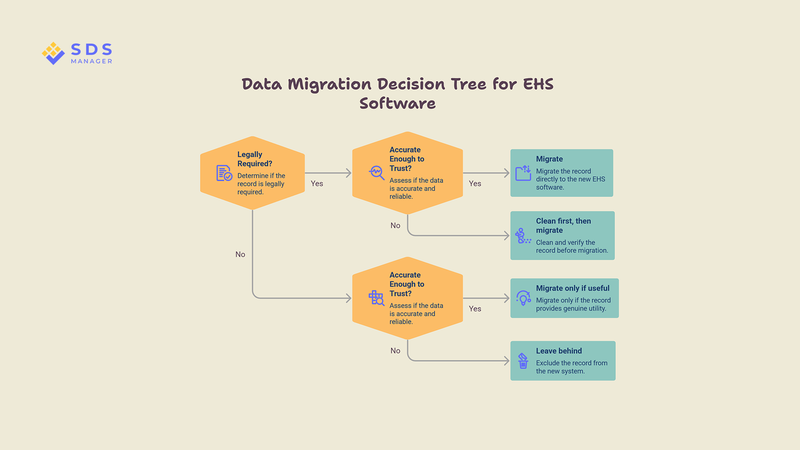
Once you know what you are keeping, clean it before you move it. Fix inconsistent naming, remove duplicates, and standardise formats.
Cleaning is a separate job from deciding: even required records need it, because moving them as is still distorts your reports and any AI features later.
Data retention rules apply here too. In the US, OSHA's recordkeeping rule (29 CFR 1904.33) requires injury and illness records (Forms 300 and 301) to be kept for five years.
In the UK, COSHH requires health surveillance records to be kept for 40 years. Whatever you migrate, check it against the original after the load, so nothing is lost or corrupted.
Step 6: Pilot, Test, Then Launch
Instead of launching company-wide, first run a pilot with one team or site using real data and real tasks. This surfaces problems while they are still cheap to fix, and while the vendor is still contractually required to fix them.
Test the system under everyday conditions: different user roles, multiple locations, and busy reporting periods. Check that notifications, permissions, approvals, and audit trails all behave as expected.
A pilot is ready to expand once your test users finish their daily tasks without workarounds. Error rates should settle to a level your team treats as normal, and any open issues should be minor rather than blocking.
If it falls short, fix those specific gaps with the vendor and re-test the same tasks before you widen the rollout, rather than launching on a set date regardless of results.
Once the pilot is stable and your users are confident, launch more widely, either all at once or in phases, depending on the approach you chose in Step 2.
Step 7: Monitor Adoption and Govern for the Long Term
Launch is not the finish line. Preparation gets the system ready, but what happens after launch decides whether people actually use it.
After launching, watch two things in the first few months:
- how many of your target users log in and finish tasks each week, and
- whether frontline workers report incidents in the new system instead of going back to the old way.
You have low adoption if most target users skip the system in a typical week, or if incidents are still being reported the old way. If you see either sign, do not wait it out. Ask your frontline users what is slowing them down, whether that is a confusing step, missing training, or a workflow that does not match their day, and fix that specific gap before pushing for more logins.
Set up a simple feedback channel so users can report problems and suggest fixes. Act on the changes that help the most people, and decline requests that only serve one site or add complexity.
Then add light governance: a change log that records every configuration change, clear owners for the system, and a regular review to catch issues early. This keeps the platform stable as your team and needs change.
How Long EHS Software Implementation Takes and What It Costs
How long implementation takes and what it costs depend mostly on your organisation's size, the number of sites, and how much you configure the system. A single site with light configuration can go live in a few weeks. A large, multi-site rollout can take several months.
Most vendors price EHS software per user or per site, and most give firm numbers only after a scoping call, so plan to gather quotes. The patterns below are typical rather than exact.
| Organisation size | Typical timeline | Typical scope | Pricing model |
|---|---|---|---|
| Small (single site, under 100 staff) | A few weeks | Core modules, light configuration | Fixed or per-user subscription |
| Mid-size (2–10 sites) | 1 to 3 months | Several modules, some integrations | Per-user or per-site, quote-based |
| Large enterprise (10+ sites) | 3 to 6 months or more | Full platform, heavy configuration, many integrations | Custom, quote-based |
Setup fees vary too. Some vendors charge separately for implementation, so when comparing EHS platforms, ask if the implementation fee is included or separate.
Some platforms, including EHS Solutions by SDS Manager, include onboarding and implementation at no extra cost beyond the subscription.
What Are the Most Common Mistakes in EHS Software Implementation?
Here are the most common mistakes in implementing EHS software that cost the most time and money:
- Over-configuring the system: Each extra customisation feels helpful on its own, but they pile up. Enough of them make upgrades, training, and maintenance harder, and start to hide how your process actually works.
- Underestimating data migration: Poor-quality or badly mapped data creates rework, broken reports, and lost trust. Fixing it after launch costs far more than doing it right the first time.
- Weak user adoption: If frontline workers are not trained or consulted, they resist the change and usage drops. Adoption, not features, decides whether the rollout works.
- Poor stakeholder alignment: When teams are not aligned early, expectations drift, decisions get reworked, and hidden costs surface in unclear contracts and scope long after the project starts.
- Unvalidated AI features: AI only helps if it is tested against your real workflows. Paying for AI that does not fit your processes adds cost without adding value.
Turn These Steps Into a Successful Implementation
A successful EHS software implementation is built on preparation. Work through the seven steps in order, involve the people who will use the system, and treat data quality and adoption as seriously as the software itself.
Once you can do all that, the platform becomes something your team relies on rather than another tool they work around. Start with a clear needs assessment, and let each step build on the last.
And if you want a platform that keeps setup and onboarding simple, EHS Solutions by SDS Manager includes both at no extra cost, so more of your time goes into the steps that matter.
Frequently Asked Questions
Is EHS Software Difficult to Implement?
No, EHS software is not inherently difficult to implement. The software itself is rarely the hard part. Difficulty usually comes from weak preparation, unclear goals, messy data, or poor communication. Teams that plan well, involve frontline users, and clean their data first tend to find it straightforward, even across several sites.
Do You Need IT Involved to Implement EHS Software?
Yes, you need to involve IT to implement EHS software in almost every case. IT is essential for integrations, data security, access controls, and links to your existing tools. Even simple, out-of-the-box rollouts benefit from IT oversight of data flows and permissions. Some vendors also lighten the load: EHS Solutions by SDS Manager implements EHS software for free, so your IT team can focus on integrations rather than setup.
Should You Migrate All Your Old Safety Data to the New System?
No, you should not migrate all your old safety data to the new system. Move only the records you need, plus any you are legally required to keep. Such as incident forms and health records.
How Do You Measure a Successful EHS Software Implementation?
You measure a successful EHS software implementation by comparing results against the baseline you set at the start. Look for high adoption, faster incident reporting, fewer missed audits, and cleaner data. Track these in the first few months after launch. Review them regularly as part of governance.

Arysha Alif Khan

Arysha Alif Khan is an EHS and chemical safety specialist with a background in biochemistry, biotechnology, and public health. She works closely with the product and regulatory teams to turn complex chemical regulations, SDS requirements, and workplace safety standards into clear, practical guidance for people.