Every hazardous chemical you ship in the US needs a safety data sheet, and someone has to write it. Most manufacturers and importers face the same choice: hire an SDS authoring service or write SDSs in-house with software.
The answer depends on how many SDSs you keep and how often your formulas change.
A service suits a few SDSs that rarely change, or one product that needs expert toxicology judgment. On the other hand, software pays off as your product line grows or reformulations pile up.
Either way, your company is legally responsible for every SDS it ships.
In this article, you’ll see how the two routes differ, what each costs over time, when a hybrid makes sense and which one fits your product line.
Key Takeaways
- Choose SDS authoring software if your product line is growing, your formulas change often, or you sell in more than one market or language.
- Choose an SDS authoring service if you have a few SDSs that rarely change, need a one-off job, or have no one in-house who can review a hazard classification.
- Choose a hybrid of software and a service if you have an old library to clean up before routine upkeep, or a mostly routine line with one product that needs toxicology judgment.
- The chemical manufacturer or importer stays legally responsible for every SDS it ships, whether software, a consultant or its own staff wrote it.
Key Differences Between SDS Authoring Software and SDS Authoring Services
The key differences between SDS authoring software and SDS authoring services are who does the classification and drafting, how fast a revision comes back and how you pay.
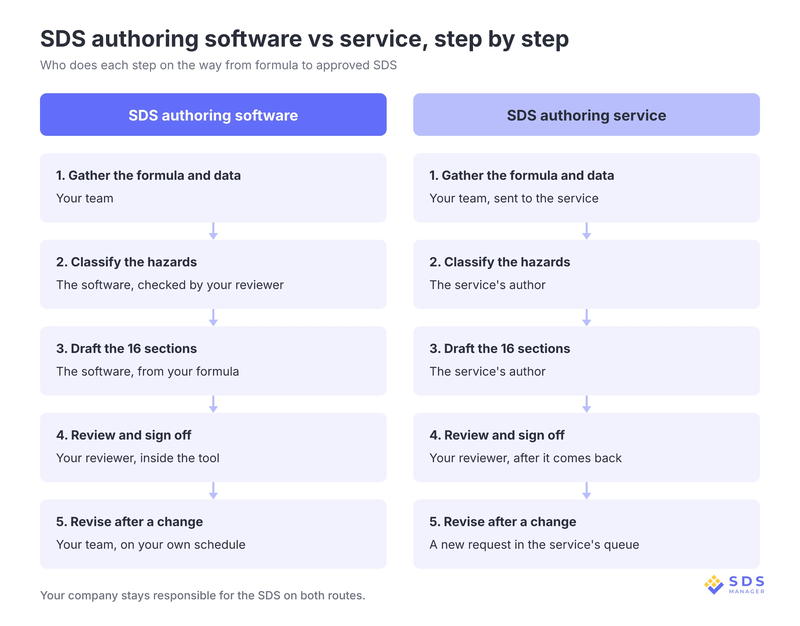
With software, your team enters the formula and the tool drafts the SDS. In the case of a service, an outside author writes it and sends it back.
| Factor | SDS authoring software | SDS authoring service |
|---|---|---|
| Who classifies hazards and drafts the 16 sections | The software, from your formula | The service's author |
| Who reviews before release | Your reviewer, inside the tool | Your reviewer, after it comes back |
| Turnaround for a new SDS | Minutes to draft, plus your review | 3 to 10 business days; rush within 24 hours from some services |
| Turnaround for a revision | Your own schedule, often the same day | The service's queue, usually days |
| What you get back | An editable SDS you can revise | Usually a finished PDF |
| Extra languages | Often included in the plan | Quoted per language |
| Matching GHS label | Made from the same SDS data in many tools | Often a separate service line, so check the quote |
| Who sees your formula | Your team, in your own account | The service's staff, under an agreement |
| Pricing model | Per year or per SDS | Per SDS and per change |
| How revisions are billed | Included in annual plans | Usually quoted as new work |
SDS authoring software works out a product’s hazards by applying OSHA’s mixture rules to the hazard data for each ingredient. It then fills in the 16 sections from that classification, which takes only a few minutes.
On the other hand, a service author does the same work by hand, so a new SDS takes 3 to 10 business days.
SDS authoring software is also faster and cheaper to run compared to services, and that matters most for revisions. With authoring software, you can update the SDS yourself, often the same day, and plans usually include revisions.
Conversely, with a service, each change waits in the queue and is usually billed as new work.
However, the catch is that SDS authoring software only applies the rules to the data you give it. Your team has to check what it produces, and it can’t judge an ingredient with missing or conflicting test data the way a toxicologist can.
How Much Do SDS Authoring Services and Software Cost?
SDS authoring services start at around $99 for a standard English-language SDS for the US market, before extras. Most large US authoring firms don't publish a per-SDS price and quote each project instead. Similarly, most software-based solutions are quote-based only and lack transparency in pricing.
Service prices. The base price covers one SDS for one market in one language. Translations, rush turnaround, a written classification rationale (one service charges $150 for it) and substantial reformulations are quoted on top of the base fee.
Software prices. Fewer software vendors publish prices, but ExactSDS, SDS Manager's own SDS authoring software, lists its plans publicly. Pay-as-you-go costs $199 per SDS with one round of edits, and further revisions need an annual plan. Standard plans run from $1,499 a year for 15 SDSs, about $100 each, to $9,299 a year for 300 SDSs, about $31 each, with revisions and translations included.
For a library a service has already written, ExactSDS's Basic plan imports the existing SDSs and updates, revises and translates them, from $199 a year for up to 4 SDSs to $1,990 a year for 100 to 499. A self-service tool from another vendor starts at $275 per product document, and many other SDS authoring tools share prices only on request.
| 10 SDSs, 1 revision a year | 100 SDSs, 30 revisions a year | |
|---|---|---|
| Software, Standard plan | 15-SDS plan × 3 years = $4,497 | 100-SDS plan × 3 years = $17,097 |
| Service at $99 per SDS and per revision | 10 new + 3 revisions = $1,287 | 100 new + 90 revisions = $18,810 |
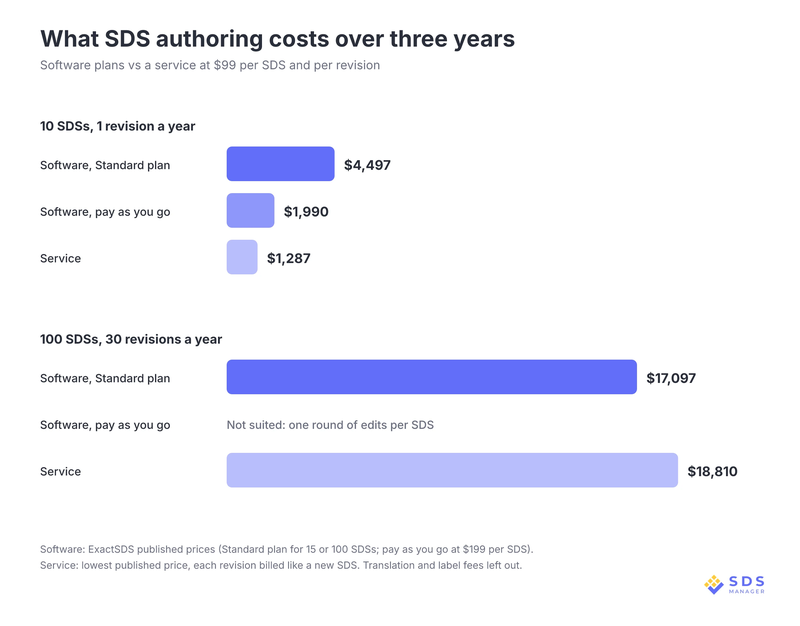
So, for the long term, SDS authoring software costs less even at the lowest published authoring service price, and the gap widens with every translation or service quote above $99. However, the service costs far less for the small, stable line.
Break-even check: Divide the yearly plan price by what a service charges per job. The 15-SDS plan at $1,499 a year equals about 15 service jobs a year at $99, or about 7 at a $200 quote. If your new SDSs and revisions in a year add up to more than that, software costs less.
The plan size follows how many SDSs you keep, not how many jobs you send, so a company keeping 20 SDSs needs the 30-SDS plan at $2,299 a year.
However, with software, there is a cost that no pricing table shows. The software team needs time to set up the account, load existing SDSs and learn the review steps.
With a service, someone in your team still gathers the formula data, answers follow-up questions and reviews each draft that comes back.
Turnaround and Revision Speed
With SDS authoring software, turnaround and revision speed are much faster compared to SDS authoring service.
With software, your own team makes the change and decides when the new version goes out. With a service, each change is a new request that waits in the service's queue. How often an SDS should be updated depends on what changes, and for significant new hazard information, OSHA gives you three months once you become aware of it.
Who Is Legally Responsible for Writing the SDS
Whoever writes the SDS, the chemical manufacturer or importer answers for it. The Hazard Communication Standard says manufacturers and importers must "obtain or develop" an SDS for each hazardous chemical they produce or import (29 CFR 1910.1200(g)(1)), and buying software or hiring a consultant doesn't move that duty.
The same company must classify the hazards of what it produces or imports. Whoever prepares the SDS must make sure it reflects the scientific evidence behind that classification (paragraph (g)(5)).
Importers: You can use the foreign manufacturer's SDS as long as it meets the US format and is in English. If it doesn't, you have to revise it or author your own before the product ships.
Consultant mistakes: OSHA cites your company, not the consultant, for a consultant's mistake, and hazard communication was the second most-cited OSHA standard in fiscal year 2026, based on OSHA's data through August 31. As of 2026, OSHA can fine up to $16,550 for each serious violation and up to $165,514 for a willful or repeated one, and it adjusts these maximums for inflation every year.
A contract can shift some of the cost of an error, but not the duty:
- A consultant contract can cover the cost of correcting an SDS the consultant got wrong, reprinting labels after a correction, rework fees and turnaround commitments.
- Your company keeps the OSHA citation for a wrong or missing SDS, the job of spotting new hazard data and getting it onto the SDS in time, and the sign-off before each SDS ships.
A good consultant does lower the chance of a wrong classification, and that is a fair reason to hire one. Assign one person in your company to review and sign off every SDS, whichever route wrote it.
Authoring software rarely makes calculation or copy errors because it applies OSHA’s mixture rules the same way every time. Most errors that remain come from the ingredient data, so a wrong supplier SDS produces a wrong SDS of your own.
How to Review an SDS Drafted by Software or a Consultant
The person who signs off each SDS needs to know how the Globally Harmonized System (GHS) hazard classification works. They should know the health and physical hazard criteria in Appendices A and B of the Hazard Communication Standard. They should also be able to read the toxicity and test data behind each ingredient.
AI-drafted SDSs follow the same rule. OSHA sets what an SDS must contain and how accurate it must be, not how it gets written. So, an SDS drafted by AI can meet the Hazard Communication Standard once a qualified person checks it.
A human reviewer checking an AI-drafted SDS should at least compare:
- The hazard classification against the ingredient data
- The composition in Section 3 against the actual formula
- The hazard information in Section 2 against the product label
What Should You Ask Before Buying Software or Hiring an SDS Consultant?
The questions that matter most are about revisions, your data and sign-off, because those costs come after the first SDS. Ask any software vendor or SDS consultant these before you commit:
- Pricing: How are a revision, each extra language and the matching label priced?
- Speed: How fast does a revision come back, compared with a new SDS?
- Confidentiality: Who sees your formula, and under what confidentiality terms?
- Format: Do you get an editable SDS or a locked PDF, and can you export your data if you leave?
- Sign-off: Who signs off each version, and is that sign-off recorded?
- Rule changes: How does the vendor or consultant track changes to SDS authoring requirements, including state right-to-know lists such as California's Proposition 65 list, which many SDSs mention in Section 15?
- Trial or credentials: For software, can you test it on one of your own products first? For a consultant, what is the author's background?
- Error cover: For a consultant, does the contract pay for fixing an SDS they got wrong?
Have these ready either way, because both routes start from the same information:
- The full formula, with each ingredient's Chemical Abstracts Service (CAS) number and percentage
- Any test data you hold, such as flash point or toxicity results
- The supplier SDS for each raw material, which you can find through an SDS online if a copy is missing
When Does a Hybrid SDS Authoring Approach Make Sense?
A hybrid approach makes sense when most of your SDS work is routine but some of it needs outside expertise or extra capacity. Software handles the routine authoring and revisions, and a service takes the jobs your team can't or doesn't want to do in-house.
Most hybrids split the work by job type:
- Clean-up, then upkeep. A service converts an old library of material safety data sheets (MSDSs) to the current 16-section format, and software handles every revision after that.
- Routine line, hard product. Software covers the products with well-known ingredients, and a service classifies a new substance with little test data.
- Steady work, sudden surge. Software handles day-to-day changes, and a service takes on extra work when a rule change makes many SDSs out of date at once.
The main risk in a hybrid is two versions of the same SDS, one from each route. A hybrid works best when every finished SDS is kept in one master library, such as safety data sheet management software, so that nobody works from an outdated version.
SDS Authoring Software vs Service vs Hybrid: Which One Is Right for You?
The right route depends on how many SDSs you keep, how often they change and whether anyone in-house can review a hazard classification.
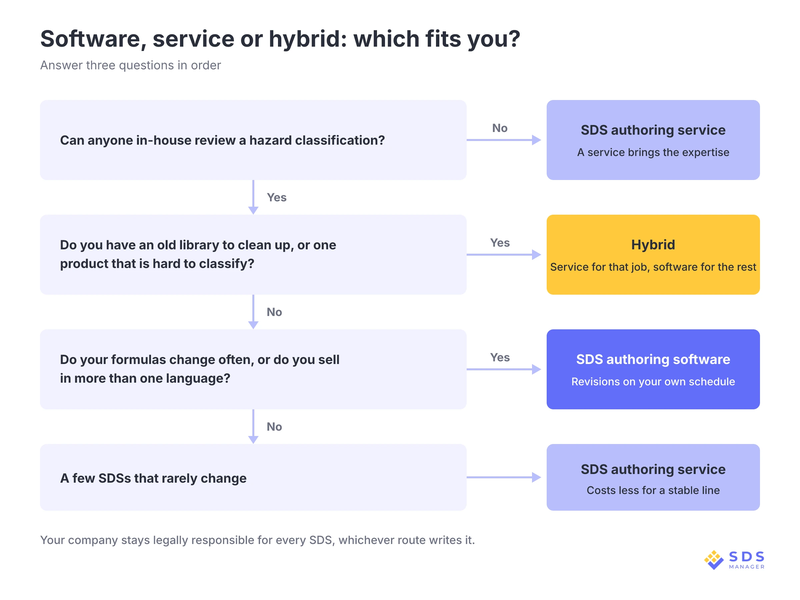
If more than one route fits, let price decide: once a service would bill you for more than about 15 jobs a year at $99 each, software costs less.
SDS Authoring Software Is the Right Fit If
- A new product or reformulation every quarter. Your team revises each SDS on its own schedule, so each change doesn't wait in a queue.
- 200 SDSs sold in four languages. Annual plans often include translations and revisions, which services quote per job.
SDS Authoring Service Is the Right Fit If
- Three products whose formulas haven't changed in years. Three SDSs are written once, with no revisions to pay for later.
- A new substance with little test data. Classifying it takes toxicology judgement that most in-house teams can't check.
- Nobody in-house can check a hazard classification. Outsourcing SDS authoring brings that expertise without a new hire.
Hybrid Approach Is the Right Fit If
- A clean-up of old MSDSs, then routine upkeep. A service handles the one-off clean-up, and software handles the upkeep afterward.
- A mostly routine line with one hard-to-classify product. Software covers the routine SDSs, and a service classifies the hard product.
One Tool for Every Kind of SDS Authoring Need
An SDS has to match the formula that ships, and significant new hazard information has to reach it within three months. Sending every change to an outside queue and paying for each one makes that deadline harder to meet with every product you add.
An SDS has to match the formula that ships, and significant new hazard information has to reach it within three months. Sending every change to an outside queue and paying for each one makes that deadline harder to meet with every product you add.
ExactSDS, SDS Manager’s SDS authoring software, has a plan for all types of SDS authoring needs.
For instance, the “Pay As You Go” plan handles a one-off SDS without a yearly commitment. The “Basic” plan lets you import an old library and keep it current.
Also, the “Standard” plan covers a growing line that you write and revise yourself, and finally the “Enterprise” plan covers large portfolios that need bulk generation and a dedicated account manager. As your needs change, you move to a different plan and stay in the same tool.
Plans are based on how many SDSs you keep, and revisions and translations of an SDS don’t count as new ones. A reformulation becomes a quick edit instead of a new order.
Start a free trial and have your next revision ready before the new batch leaves the plant.
Frequently Asked Questions
Who can author an SDS?
An SDS can be authored by anyone the chemical manufacturer or importer chooses, including its own staff, SDS authoring software or an outside consultant. OSHA doesn't license SDS authors, but the company that ships the product remains responsible for the SDS being accurate.
Can I create my own SDS?
Yes, you can create your own SDS if you manufacture or import the chemical, because OSHA lets you obtain or develop one. It must follow the 16-section format, be in English and reflect the evidence behind your hazard classification.
When does an SDS need to be updated?
An SDS needs to be updated within three months of learning of significant new hazard information, and the product label within six months. A reformulation, new test data or a change to OSHA's hazard communication rules usually starts the update.
Do I need an SDS for a product that isn't hazardous?
No, you don't need an SDS under OSHA for a product that isn't hazardous, because the requirement covers hazardous chemicals only. The product's hazard classification decides it, so the product has to be classified before you know whether it needs an SDS.
Do I need a separate SDS for each product variant?
No, you don't need a separate SDS for each product variant when the variants are similar mixtures. OSHA lets one SDS cover mixtures whose ingredients are essentially the same and whose hazards are similar, even when the exact amounts differ.

Arysha Alif Khan

Arysha Alif Khan is an EHS and chemical safety specialist with a background in biochemistry, biotechnology, and public health. She works closely with the product and regulatory teams to turn complex chemical regulations, SDS requirements, and workplace safety standards into clear, practical guidance for people.