
There is no fixed schedule for updating an SDS. Under OSHA’s Hazard Communication Standard, whoever prepares the SDS must add significant new hazard information within three months, and employers must keep the current SDS for each hazardous chemical, replacing it when the revised version arrives with the first shipment after the update.
These rules come from 29 CFR 1910.1200(g) and apply to US manufacturers, importers, distributors and employers. In the EU, REACH requires suppliers to update an SDS without delay when new hazard information becomes available.
Every Safety Data Sheet (SDS) acts as the frontline reference for chemical hazards. When it’s out of date, workers lose access to crucial information on exposure limits, PPE requirements, and emergency actions.
Accurate, timely revisions therefore safeguard employee health, streamline audits, and prevent fines.
Key takeaways
- Whoever prepares an SDS must add significant new hazard information within three months (29 CFR 1910.1200(g)(5)).
- Updated SDSs must reach distributors and employers with the first shipment after the update.
- OSHA sets no expiration date for SDSs; review them on a set cycle, such as quarterly checks and an annual audit.
- Common update triggers are new hazard data, formulation or supplier changes, and regulatory actions such as GHS revisions.
- SDS management software can watch supplier websites for new SDS versions and alert you, so you don’t check each sheet by hand.
SDS Update Deadlines by Agency
OSHA and EPA each have their own deadline for updating and resubmitting an SDS once new hazard information comes to light. The table below shows what each agency requires and which rule sets it.
| Jurisdiction | Update Deadline | Relevant Rule / Standard |
|---|---|---|
| OSHA – Hazard Communication Standard | Within 3 months of becoming aware of significant new information about a chemical’s hazards or ways to protect against them | 29 CFR 1910.1200(g)(5) |
| EPA – Emergency Planning and Community Right-to-Know Act (EPCRA) | Within 3 months of discovering significant new information, submit the revised SDS to the SERC, LEPC, and local fire department | 40 CFR 370.31(a) and 370.33(b) |
What triggers an SDS update?
SDS updates are not tied to a calendar but are required whenever certain events occur. The most common triggers include:
- Discovery of New Hazards
This could include new toxicology data, reclassification of health effects, or changes in permissible exposure limits. - Changes in Formulation or Supplier
Even small shifts in ingredients or manufacturing sources can alter a product's hazard classification. - Regulatory Actions
New GHS classifications, restrictions, or authorizations may affect how a chemical must be communicated. - Operational Feedback
Safety incidents or internal investigations can reveal gaps or inaccuracies in existing SDS content. - Advancements in Protective Measures
If better PPE or engineering controls are introduced, the SDS must reflect them.
When any trigger surfaces, OSHA gives the manufacturer, importer or employer preparing the SDS three months to add the new information, and the updated SDS must reach distributors and employers with the first shipment after the update.
Recommended Review Cycles & Best Practices
Although OSHA does not enforce a fixed review cycle, proactive organizations follow structured intervals to stay ahead:
| Review type | When / trigger | What to do | Best-practice tip | Outcome |
|---|---|---|---|---|
| Quarterly Reviews | Every quarter | Monitor supplier and agency bulletins for changes that affect your SDS in use. Log any changes and flag impacted documents. | Subscribe to vendor bulletins and regulatory updates. Maintain a simple change log. | Catch changes early; reduce compliance gaps. |
| Annual Audits | Once per year | Compare your SDS files with the latest manufacturer versions. Revalidate any document older than two years. Update binders and links. | Use a master inventory and version control checklist. | Ensure accuracy and legal compliance. |
| Post-Incident Checks | After any spill, exposure, or near-miss | Recheck the SDS for clear, current emergency response steps. Update training, signage, and procedures as needed. | Conduct a short debrief with EHS officers and supervisors. Record corrective actions. | Close gaps and prevent repeat events. |
These review habits ensure you don’t rely solely on external notifications to keep your safety documentation accurate.
Do SDS expire?
No, SDSs do not expire. OSHA sets no expiration date for a safety data sheet; an SDS stays in use until the manufacturer or importer issues a revision. Because suppliers can revise an SDS without you noticing, many companies treat an SDS’s age as a review prompt.
SDS Manager, for example, lets you filter your library for SDSs older than five years. That five-year mark is a rule of thumb, not an OSHA deadline. When you replace an SDS, keep the old version on file; see how long a safety data sheet must be kept.
Building an Effective SDS Update Workflow
Maintaining a robust SDS update process includes:
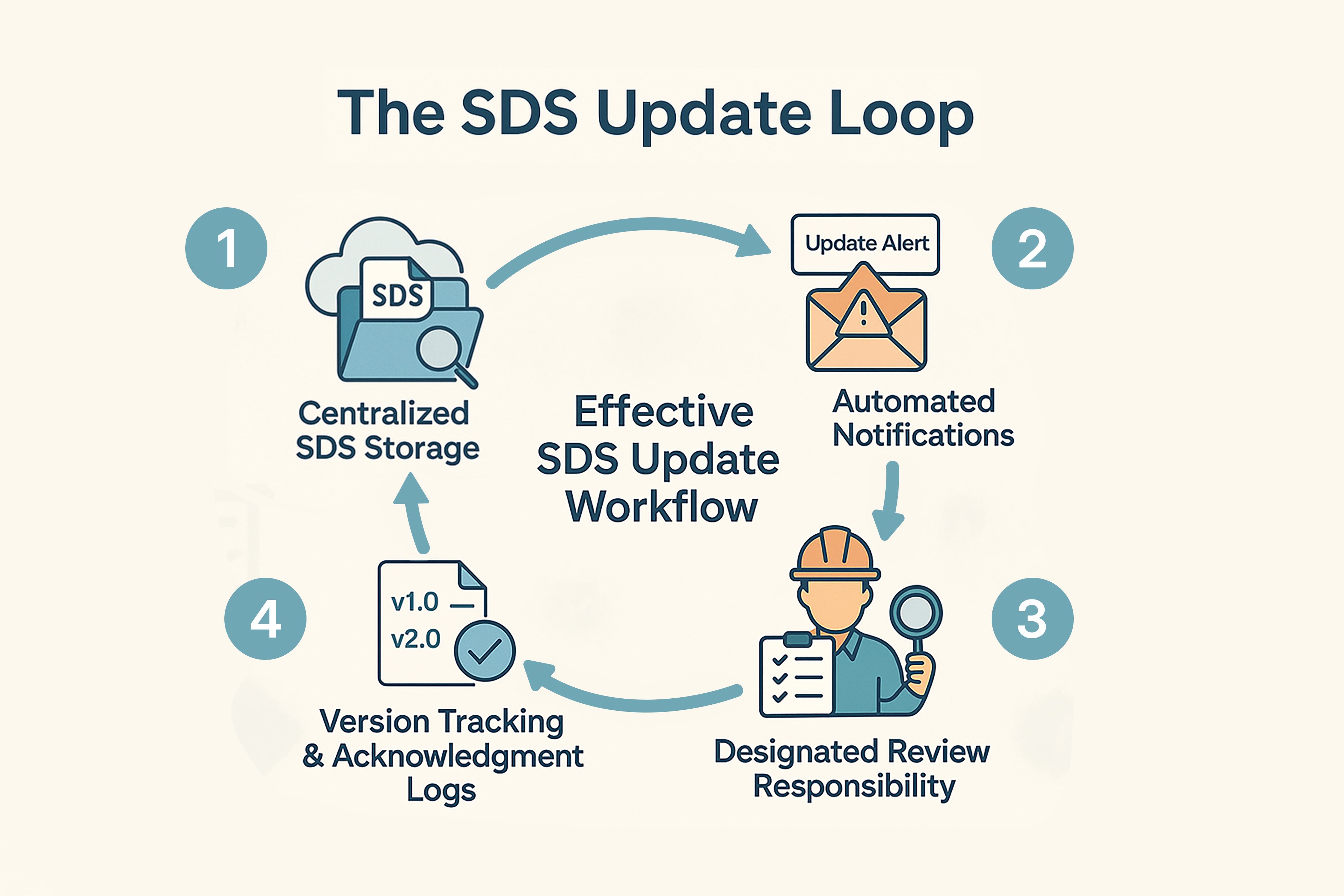
- Keep all SDS in a searchable digital library (cloud or secure local system) with role-based access.
- Enable alert systems for supplier updates and regulatory bulletins.
- Assign a dedicated EHS lead or SDS coordinator to track changes, verify relevance, and manage distribution.
- Maintain audit trails showing when employees accessed revised SDS and confirmed their review.
How employers keep SDSs current without checking manually
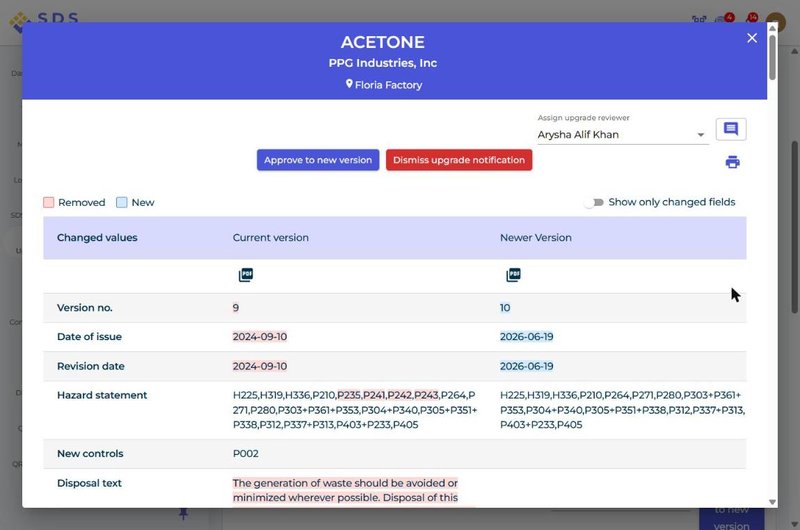
Checking every supplier’s website by hand takes time once your library grows. SDS Manager does that check for you: it searches thousands of supplier websites for SDS updates and alerts you when a newer version of an SDS in your library is found. From there:
- Get notified, including by email, when a new revision of one of your SDSs is detected.
- Compare the current and new versions side by side, with the changes highlighted.
- Update SDSs one by one or all at once, or turn on automatic updating to new versions.
- Filter your library by revision year to find outdated SDSs, such as those older than five years.
- Email the supplier in one click to request an updated SDS when no newer version is published online.
Some suppliers don’t publish their SDSs online, so automatic checks can’t catch every revision; the vendor request covers those.
Start a free trial and see which of your SDSs have newer versions →

Staying Ahead of Future Compliance Changes
OSHA’s 2024 updates aligned further with GHS Revision 7, refining how classifications and hazard statements are defined. These ongoing changes signal that SDS management must evolve too. Staying compliant requires watching regulatory trends and preparing early instead of waiting for triggers. Subscribe to OSHA and EPA mailing lists, follow industry associations, and make sure your team reviews proposed rule changes before they take effect.
Build internal habits like prompting SDS review after supplier changes and clear documentation of staff acknowledgments.This helps your organization stay ahead of new requirements and maintain hazard communication that meets both legal and safety expectations.
FAQs
How often must an SDS be updated?
An SDS must be updated whenever significant new information about a chemical’s hazards, or ways to protect against them, becomes available. OSHA requires the update within three months of becoming aware of that information (29 CFR 1910.1200(g)(5)).
Who is responsible for issuing updated SDSs?
Chemical manufacturers and importers are responsible for issuing updated SDSs, while distributors must pass them on to their customers. Employers must keep the current version readily accessible to workers. If you prepare SDSs yourself, see how to author an SDS.
Do SDSs need updates for small formulation changes?
Not always: an SDS needs an update for a small formulation change only if it affects the product’s hazard classification or protective measures. A tweak that leaves both unchanged doesn’t require a revision, but check that Section 3 still reflects the actual composition.
Are electronic SDSs accepted under OSHA?
Yes, electronic SDSs are accepted under OSHA as long as employees can get to them immediately during every shift, without barriers. You also need a backup, such as printed copies, in case of a power outage or system failure.
When must an updated SDS reach customers?
An updated SDS must reach customers with the first shipment after the SDS is updated. Manufacturers and importers must send it to distributors and employers (29 CFR 1910.1200(g)(6)(i)), and distributors must pass it on the same way (g)(7)(i).