SDS management means collecting a current safety data sheet for every hazardous chemical you use, organizing the sheets so anyone can find the right one quickly, and replacing them when suppliers issue new versions. In the EU, employers must give workers access to the SDS information for the chemicals they use or may be exposed to REACH.
Every organization that uses hazardous chemicals, whether in manufacturing, labs, construction or office work, needs an SDS for each of them, and has to make those SDSs easy for employees to reach.
If you’re starting from scratch, or your paper binders have fallen out of date, this guide takes you through SDS management in six steps.
Key takeaways
- Organize an SDS binder by location, then A–Z, with an index at the front of each binder.
- Keep binders in the work areas where chemicals are stored or used, so workers can reach them during every shift.
- Suppliers must update an SDS without delay when new information on hazards or risk management appears (REACH Article 31(9)).
- Keep the information you need for REACH duties for at least 10 years after you last used a chemical (Article 36).
- SDS Manager builds the library for you, tracks supplier updates and gives workers QR-code access.
What is SDS Management?
SDS management involves organizing, storing, and tracking your Safety Data Sheets for every chemical in your business. It lets employees find the SDS for the chemical they are handling when they need it, and keeps the information on each SDS current. In the EU, the SDS format and update rules come from REACH Article 31 and Annex II, and hazard classification follows the CLP Regulation.
Step-by-Step Guide to SDS Management
Step 1: Creating an Overview of Chemicals
The first step is identifying all the chemicals used in your workplace, because every later step depends on that list. Without a complete list, SDSs go missing, chemicals are handled without the precautions their SDS sets out, and compliance gaps go unnoticed.
To get started, list every chemical present in your facility. Check all areas where chemicals are stored, used, or disposed of. This includes storage rooms, laboratories, maintenance areas, and production floors. Walk through each area systematically and document every chemical container you find. For each chemical, record key details such as its name, manufacturer, and storage location.
Step 2: Finding and Collecting SDSs
Once you have a complete list of chemicals, the next step is to gather the corresponding Safety Data Sheets. SDSs are not always easy to find. You may only have the paper copies suppliers sent with past deliveries, and those may be out of date, while older or rare products can be hard to trace.
Here are several ways to search for SDSs effectively:
- Search online: Manufacturers and suppliers usually post SDSs on their websites. A quick Google search with the right terms can help you find them. Try searching terms like "Safety Data Sheet [Product Name]" or "[Product Name] SDS PDF" to get accurate results.
- Use SDS databases: Another good choice is to use SDS databases. These databases give access to thousands of SDSs. Businesses can search and download the latest versions quickly. This method is much more efficient than searching online by hand. It removes the guesswork in checking whether an SDS is the latest version. SDS Manager offers a free SDS search where businesses can find up-to-date SDSs for their chemicals.
- Reach out to suppliers: If you cannot find SDSs for chemicals online, you may need to contact suppliers directly. You can request the latest version of the SDS for each chemical purchased via email or phone. Under REACH, the supplier must provide the SDS free of charge, on paper or electronically, no later than the first delivery.
Step 3: Organizing Your SDS Library
Having SDSs is not enough; they must be organized so employees can easily find them when needed. Here are three ways you can organize your SDS library: paper binders, a folder-based system or SDS management software.
How Do You Organize an SDS Binder?
Organize an SDS binder by location first, then alphabetically by product name within each location, with an index at the front listing each product, its supplier and its page. Workers then find the sheets for the chemicals in front of them, and a master index covers the whole site.
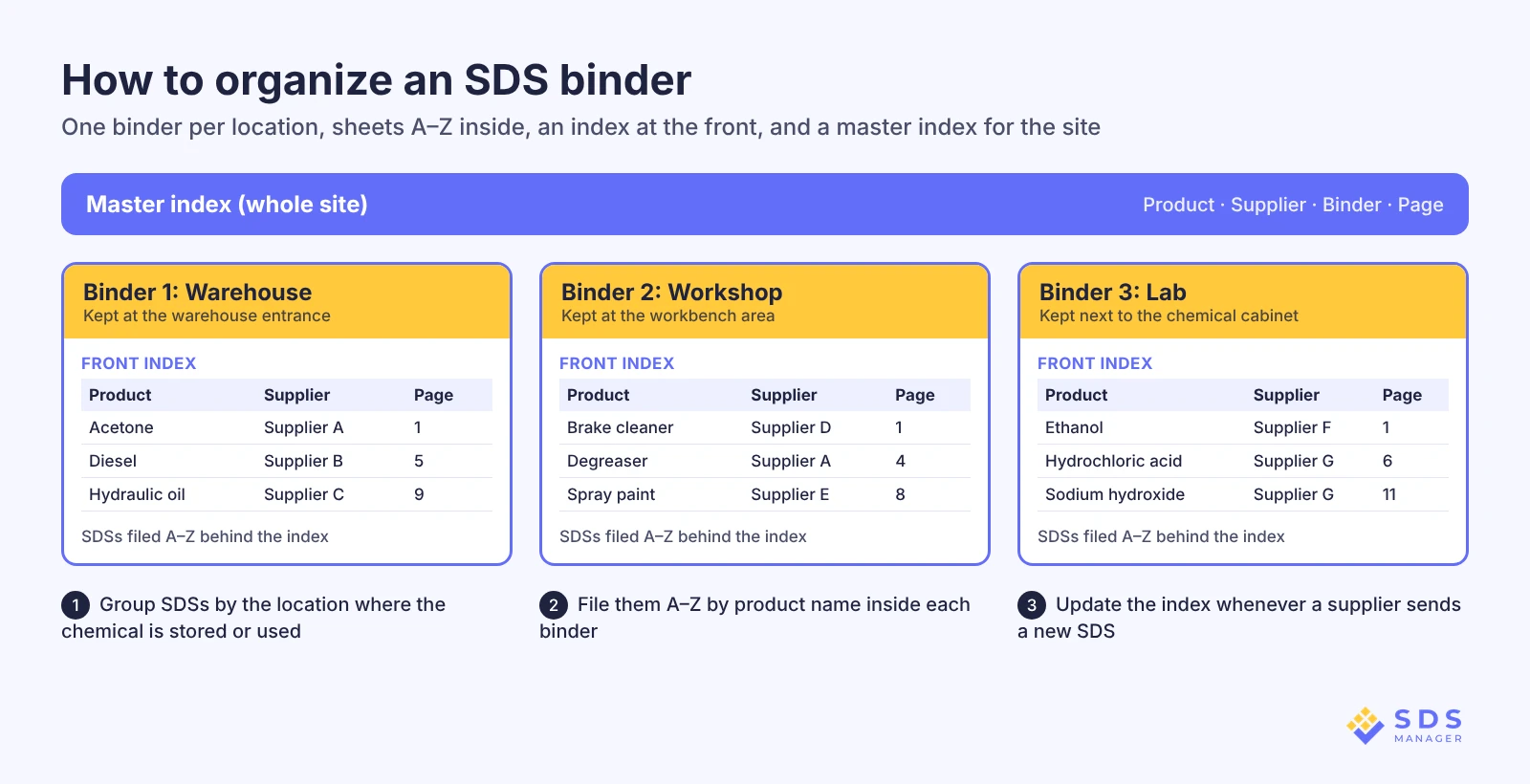
Traditionally, businesses have stored printed SDSs in paper binders. If you prefer paper binders, file the printed SDSs in dedicated binders, grouped by location, product name or manufacturer, so each SDS is easy to retrieve. Here’s how to create a paper binder system:
- Categorize Your Chemicals: Group your chemicals by where they are used or stored, then file them alphabetically by chemical name or manufacturer within each group.
- Allocate Binders: To keep your Safety Data Sheets (SDSs) organized and easy to access, it’s a good idea to plan how many binders you’ll need based on the total number of SDSs and how you want to categorize them. As a general rule of thumb, try to keep each binder to around 25–50 SDSs. Smaller binders are easier to handle and quicker to flip through. Keeping binders lightweight also makes it simpler to update or replace SDSs when changes happen. If you’re managing a large number of SDSs, split them across several binders.
- Print and Insert SDSs: Print a hard copy of each SDS and insert it into the binder for its location or group. Sheet protectors aren’t required, but they prevent wear from frequent handling and protect against spills and smudges, which matters most in high-use areas.
- Create an Index: For each binder, create a detailed index at the front. Include the chemical name and page number (if you number the pages within the binder). Consider a master index if you have numerous binders, listing the binder and the chemicals found within. Consider also keeping an electronic SDS binder as a backup. Here is an example of an electronic SDS binder.
- Strategic Placement of Paper Binders: Show every employee where the binder for their work area is kept.
Where Should SDS Binders Be Kept?
SDS binders should be kept in the work areas where the chemicals are stored or used, so workers can reach the SDS for any chemical they handle during every shift without leaving the area.
Drawbacks of Paper Binders:
While this method is simple, it has major challenges. Paper binders go out of date whenever a supplier revises an SDS and nobody replaces the printed copy, and searching through them during an emergency can waste valuable time. Maintaining a physical index also requires constant updates, which can be tedious and prone to errors.
Creating a Folder-Based System:
A more modern approach is a folder-based system: SDS PDFs organized into clearly labeled folders and subfolders by site and location. Store these folders on cloud storage so your team can access them when they need it.
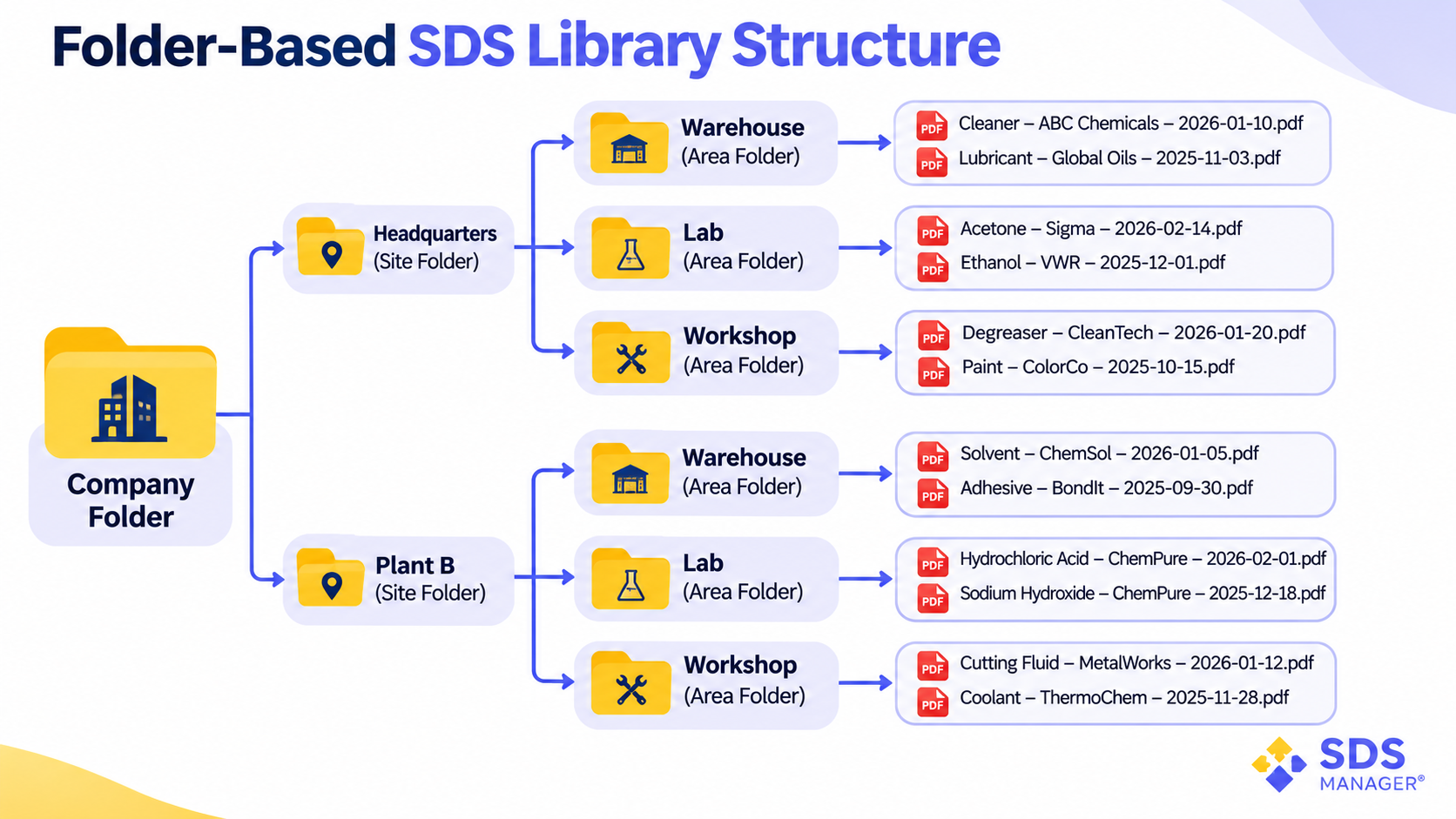
To create a folder-based system, decide on a clear and logical folder structure on your shared cloud storage or network drive. To keep your digital SDS library organized and easy to navigate, start with a main folder named after your company.
Inside this folder, create subfolders for each site or facility (e.g., "Headquarters," "Plant B"). Within each site folder, you can create additional layers based on departments, buildings, specific areas, or even floors.
This hierarchical setup helps you quickly locate the SDS you need without digging through unrelated files and keeps your chemical documentation neatly separated. The flowchart below shows an example structure.
Drawbacks of a Folder-Based System:
This method is better than paper binders because employees can get SDSs from any location. However, it still has some drawbacks. Folder storage requires manual organization and indexing.
As the number of SDSs grows, keeping everything properly categorized becomes harder and more time-consuming. Someone also has to keep shared links to the files working and make sure everyone follows the same naming rules.
Using SDS Management Software:
The most efficient solution is to use SDS management software. This software organizes SDSs automatically and lets you search them by chemical name, manufacturer, CAS number or the item number from your ERP system.
Step 4: Making SDSs Easy to Access
Even with a well-organized SDS library, employees still need to reach an SDS quickly. In an emergency, every minute spent looking for an SDS delays the first-aid and spill measures in Sections 4 and 6.
To solve this, give employees more than one way to reach an SDS. If you use paper binders, place them at workstations and in chemical storage areas.
However, a more effective approach is to use SDS management software with digital access tools like QR codes and barcode scanning. Put QR code posters where employees handle chemicals, so they can scan them at the point of use. With mobile apps, QR codes and barcodes, your employees can open an SDS wherever and whenever they handle a chemical.
Step 5: Keeping SDSs Up to Date
Under REACH Article 31(9), suppliers must update an SDS without delay when new information on hazards, or new information that may affect risk management measures, becomes available, when an authorization is granted or refused, or when a restriction is imposed. They must send the new version to everyone they supplied in the previous 12 months.
The best practice is to review your SDS library on a fixed schedule, replacing older versions with the latest ones obtained through online searches, supplier contact, or automated tracking systems.
For paper binders, that means replacing outdated SDSs as soon as you find them and updating the index. For folder-based systems, it means checking the PDF files on the same schedule, replacing outdated ones and adding SDSs for new chemicals as they arrive. For more detail, see how often an SDS should be updated.
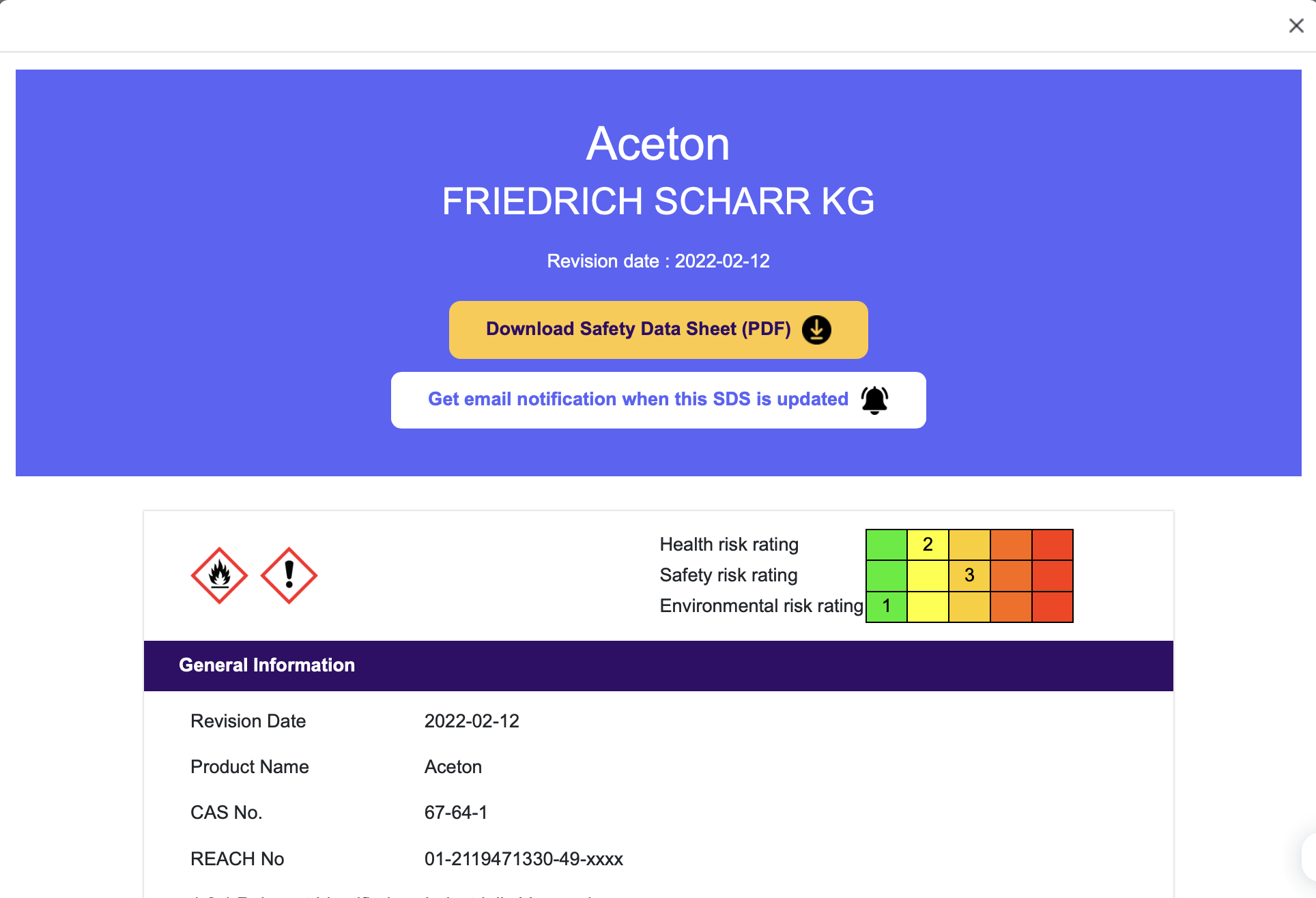
SDS Manager automatically monitors thousands of supplier websites and notifies you when a new SDS version becomes available. You can also choose to receive email notifications about updates directly from our free SDS search.
Here’s how to use the free SDS search:
- Go to the free SDS search.
- Use the search bar to enter a chemical name, product, supplier, CAS number, UFI number, or EU number.
- The search covers more than 30 million SDSs and shows the matching results.
- From there, you can download and print the SDS you need.
- Click the email notification option on the SDS page to be notified whenever an updated version becomes available.
Step 6: Training Employees on SDS Use
Even a well-organized SDS library is of little use if employees don’t know how to read an SDS or where to find one. Many workers are unfamiliar with how to read an SDS, what information to look for, or where to find SDSs in an emergency. Training works best when it is hands-on and uses real-world scenarios. Key training methods include:
- Understanding SDS Structure: Under REACH Article 31(6), an SDS has 16 sections, covering chemical identity, hazards, first-aid measures, and more. Employees should be trained to quickly identify and understand these sections so they can respond effectively in emergencies. See how to read an SDS for a section-by-section guide.
- Hands-On Training: Practical workshops, role-playing, and simulation exercises help employees interact with SDS documents and practice applying their knowledge in real-life scenarios, like chemical spills.
- Integration with Safety Programs: SDS training should be included in broader safety programs. It should start during employee orientation and continue with regular refresher courses to keep workers updated on new chemicals or regulatory changes.
- Continuous Learning and Updates: Chemical safety rules change, so training cannot be a one-off. Run a refresher when you add a chemical or a supplier sends a revised SDS.
- Promoting Open Communication: Make it normal for employees to ask questions about SDSs and safety practices. Hold regular safety meetings and open forums to keep employees engaged and allow them to address any concerns about chemical handling and safety protocols.
How Can SDS Manager Help?
Learn how to get started with SDS Manager and set up your SDS library.
Here’s how we can help:
- Free Setup & Training: We source your SDSs and set up your online SDS library for free.
- QR Code access: Instant SDS access for employees through intranet links, QR code posters or SDS app for iOS and Android
- Stay Up to Date: We automatically keep your safety data sheets up to date.
- Electronic SDS binders: generate a single PDF of your SDSs with an index of signal words, pictograms and PPE icons for offline access.
- And More: advanced search, and a way for employees to request an SDS that is missing from the library.
When your SDSs are collected, organized and current, and your team is trained to use them, employees can open the SDS for the chemical involved in an emergency.
Frequently Asked Questions
Can SDSs Be Kept Electronically in the EU?
SDSs can be kept electronically in the EU. Suppliers provide an SDS on paper or electronically, and Article 35 requires employers to give workers and their representatives access to the information for the chemicals they use or may be exposed to. Check your national labor inspectorate for local rules, and keep an offline copy, such as an electronic SDS binder, for network outages.
How Long Do You Need to Keep Old SDSs?
You need to keep the information behind your REACH duties, which includes old SDSs, for at least 10 years after you last used, supplied or imported the chemical. REACH Article 36 sets this period for manufacturers, importers, downstream users and distributors, and national authorities or ECHA can ask to see the records without delay.
How Often Should You Review Your SDS Library?
You should review your SDS library on a fixed schedule and whenever a supplier sends a revised SDS, because REACH sets no review cycle for users. REACH does require suppliers to update an SDS without delay when new information on hazards or risk management becomes available, and to send the new version to customers supplied in the previous 12 months.
Who Is Responsible for Providing an SDS in the EU?
The supplier is responsible for providing the SDS in the EU when a substance or mixture is classified as hazardous, is PBT or vPvB, or is on the Candidate List of substances of very high concern. REACH Article 31 requires it free of charge, no later than the first delivery, and in an official language of each Member State where the product is placed on the market.