REACH-kompatibel

Automatiserad distribution av Säkerhetsdatablad till kunder

Skicka rätt Säkerhetsdatablad med första leveransen och leverera automatiskt reviderade versioner när uppdateringar görs. Ingen manuell hantering. Ingen kalkylbladsuppföljning.

Enligt REACH-förordning (EG) nr 1907/2006, artikel 31, måste leverantörer tillhandahålla ett Säkerhetsdatablad vid första leverans av ett ämne eller en blandning som kräver ett sådant. När ny information om faror eller riskhantering blir tillgänglig ska leverantören uppdatera Säkerhetsdatabladet utan dröjsmål och skicka den reviderade versionen till alla kunder som mottagit produkten under de senaste 12 månaderna.


Förtroende av mer än 10 000 säkerhetschefer världen över
Porsche
DeLonghi
Unilever
DHL
Thule
TESMEC
ISAVIA
Innvik AS
Isfjord Norway
Zircoa
DAHLRAIL
Hans Claussen AS
Heide & Cook, LLC
Porsche
DeLonghi
Unilever
DHL
Thule
TESMEC
ISAVIA
Innvik AS
Isfjord Norway
Zircoa
DAHLRAIL
Hans Claussen AS
Heide & Cook, LLC
Vad DirectSDS gör

Vad DirectSDS gör

Global Supply Chain Logistics

Automatiskt skickar Säkerhetsdatablad till kunder

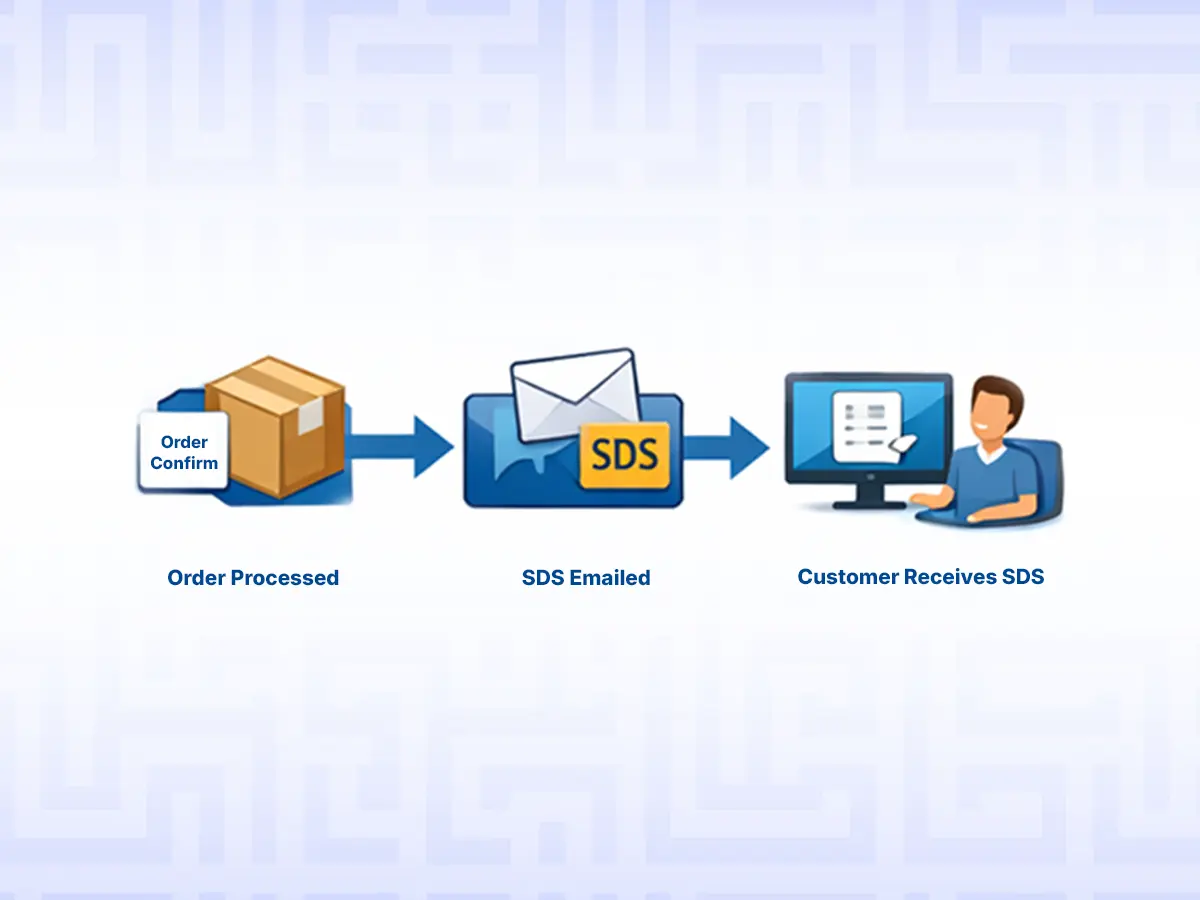
När någon köper en reglerad produkt från dig skickar DirectSDS automatiskt rätt Säkerhetsdatablad till den kunden via e-post.

Triggas vid leverans/order från ditt ERP- eller e-handelsystem.

Automatisk uppdateringslista

Efter att det första Säkerhetsdatabladet har skickats, behåller DirectSDS kunden på en uppdateringslista.

Levererar revideringar automatiskt

Om Säkerhetsdatabladet revideras får kunden automatiskt den senaste versionen.

Så fungerar det

Så fungerar det

1

Steg 1 — ERP triggar utskick

Ditt system gör ett enkelt API/webhook-anrop med: Produktkod (SKU / ERP-ID)

2

Steg 2 — Säkerhetsdatablad levereras direkt

Kunderna får ett varumärkesspecifikt e-postmeddelande med Säkerhetsdatabladet bifogat.

3

Steg 3 — Prenumeration på uppdateringar startar automatiskt

Kunden prenumererar automatiskt på uppdateringar av Säkerhetsdatablad.

4

Steg 4 — Revideringar skickas automatiskt

När ett nytt Säkerhetsdatablad laddas upp meddelas alla kunder som mottagit den tidigare versionen automatiskt.

Enkelt att starta idag, enkelt att underhålla imorgon

Migrering av SDS-bibliotek

Importera dina befintliga SDS-PDF-filer och länka dem till dina SKU/ERP-ID så att distributionen kan köras helt automatiskt från dag ett.

E-handel och katalogsynkronisering

Exportera eller synkronisera SDS-länkar + farodata (H/P-uttalanden, piktogram) för att hålla produktsidor och kataloger uppdaterade.

Leverantörers SDS-uppdateringar (inkommande inkorg)

Leverantörer skickar uppdaterade SDS-dokument till din dedikerade inkorg – DirectSDS upptäcker automatiskt revideringar, uppdaterar ditt bibliotek och meddelar prenumererande kunder.

Viktiga fördelar för ditt företag

Viktiga fördelar för ditt företag

Fullständigt automatiserad distribution av Säkerhetsdatablad

från ERP-trigger till e-postleverans.

Ett Säkerhetsdatablad, flera SKU

ingen duplicering, bara smart länkning.

CLP Artikel 48-stöd

visa faroinformation direkt på produktsidor.

Smarta prenumerationer på uppdateringar

ett köp triggar 12 månaders efterlevnad.

Flerspråkig leverans

stöd för 30+ språk.

Företagsklassad datasäkerhet

ISO 27001-certifierad.

Snabb start

onboarding på dagar, inte månader.

Gör distribution av Säkerhetsdatablad till en bakgrundsprocess

Minska efterlevnadsrisker, eliminera manuellt arbete och håll kunderna informerade automatiskt.
Påbörja gratis försöksperiodEller
30 dagars gratis provperiod. Inget kreditkort krävs.
Vanliga frågor

Vanliga frågor

How does the send_sds webhook API work?

Safety Data Sheets are automatically distributed based on the ERP product code (SKU / ERP ID) and the recipient’s email address.

  • Integration is achieved via a simple webhook call added to your ERP system. This triggers the SDS Manager send_sds API using the SKU/ERP ID and email. All modern ERP systems support webhook or API call functionality, making implementation straightforward.
  • When an SDS is sent, a new revision update subscription is automatically created in SDS Manager, ensuring the recipient will receive any revised version within the next 12 months.
  • SDSs are often linked to multiple SKUs. When several SKUs share the same SDS, the document is stored once in the SDS database and linked to all relevant products.
  • To prevent redundant emails, the system blocks repeated sending of the same SDS to the same recipient within a configurable timeframe (e.g., 12 months).
  • If a customer purchases the same product again within this window, the SDS is not resent, but the subscription is automatically extended to 12 months from the new purchase date.
  • Best practice: We recommend maintaining a HAS_SAFETY_DATA_SHEET flag in your ERP system to limit API calls only to products that require SDS distribution.

This ensures regulatory compliance while minimizing unnecessary communication.

How does the version updated subscription work?

Customers who receive an SDS are automatically subscribed to receive future updates.

  • When a new version of an SDS is uploaded, the updated document is automatically emailed to all subscribed recipients.
  • Notifications are sent for up to 12 months from the customer's most recent purchase. Duration is configurable.

As part of onboarding, SDS Manager can assist in setting up new revision update subscriptions for customers who have purchased regulated products within the past year—ensuring instant compliance from day one.

How do we map our ERP ID/SKU to the Safety Data Sheet files?

If you already maintain a library of Safety Data Sheets, all existing documents can be imported into SDS Manager.

  • If SKU/ERP ID mappings exist, SDS Manager will assist in importing and linking this data.
  • Once migrated, SDS distribution can be fully managed via API, requiring only the SKU and recipient email.

Can my customers unsubscribe from SDS revision update notifications?

Yes. Every email sent with an updated Safety Data Sheet includes an unsubscribe link.

Recipients can choose to:

  • Unsubscribe from updates related to the specific SDS included in the email, or
  • Unsubscribe from all SDS revision update notifications.

How can we display GHS pictograms and hazard statements from Safety Data Sheets on our product pages?

SDS Manager supports seamless integration with e-commerce systems to ensure your online listings remain compliant and up to date.

  • Bulk XLS exports include SDS PDF links, hazard (H) statements, precautionary (P) statements, and GHS pictograms, enabling easy updates of product pages with critical safety information.
  • The same data is available via API for real-time synchronization with your web shop or product database.

Is DirectSDS GDPR compliant?

Yes. DirectSDS is designed to support GDPR compliance and secure handling of personal data.

When using DirectSDS, customers must list SDS Manager as a sub-processing partner in their GDPR documentation and ensure that the required Data Processing Agreement (DPA) and internal compliance measures are in place, in line with GDPR requirements.

All data processed by DirectSDS is:

  • Securely stored and transmitted
  • Handled according to strict data protection and access control policies
  • Processed only for the purpose of Safety Data Sheet distribution and compliance

SDS Manager’s infrastructure and information security management are ISO 27001 certified, ensuring internationally recognized standards for data security, risk management, and operational controls.

How does the system handle updated Safety Data Sheets that suppliers send by email?

Suppliers often send updated SDSs by email. SDS Manager can automatically process and integrate these documents into your SDS library:

  • Share your SDS Manager inbound email address with suppliers to have incoming SDSs added directly to your system.
  • SDS Manager automatically reads and analyzes each document:
    • If the SDS is a newer version of an existing document, it replaces the old version and notifies all customers subscribed to that SDS.
    • If it’s a new SDS, you can assign the correct SKU/ERP ID manually or via API.

This streamlines SDS handling, keeps your library current, and ensures your customers are always informed.

What happens when a supplier sends an SDS for a new product to the system?

When a supplier sends a Safety Data Sheet (SDS) to your SDS Manager inbound email address, the system automatically processes the file.

If the SDS is not already in your system, it must be linked to the correct ERP ID or SKU before it can be distributed with an ERP reference. These SDSs are placed in the “Inbox from Vendors”, where you can quickly assign the appropriate ERP ID/SKU and make the SDS available for sending.

To ensure nothing is missed, you can enable email notifications to be alerted whenever inbound SDS files require ERP ID or SKU assignment.

This process ensures all new SDSs are properly linked, traceable to your ERP system, and ready for compliant distribution.

What happens if we call the send_sds webhook for an ERP ID or SKU that has no linked SDS?

If the send_sds webhook is called for an ERP ID or SKU that does not have a Safety Data Sheet linked to it, the request will fail and be recorded in the API error log. This log provides a complete overview of all unsuccessful send_sds calls and allows you to easily identify products that are missing corresponding SDS files.

We recommend only calling the send_sds API for products that are required to have a Safety Data Sheet.

As a best practice, maintain a HAS_SAFETY_DATA_SHEET flag in your ERP system. This allows you to restrict API calls to only those products that require SDS distribution, reducing errors and unnecessary API requests.

How can I add links to Safety Data Sheets from our eCommerce or product pages?

Each Safety Data Sheet in SDS Manager has a permanent PDF link that always points to the latest version of the SDS. When a new revision is published, the same link automatically updates to the newest version—so no changes are required on your eCommerce platform when SDS files are updated.

You have two flexible ways to add these links to your product pages:

  • XLS export: You can export your SDS library as an XLS file that includes your ERP ID(s) or SKU(s) together with the corresponding permanent SDS links. This file can be used for a bulk import or update in your eCommerce or product management system.
  • API integration: SDS Manager also provides an API that allows you to query the permanent SDS link programmatically using your ERP ID or SKU. This is ideal for real-time integrations where your eCommerce platform dynamically retrieves the correct, up-to-date SDS link for each product.

Both approaches ensure your customers always have access to the correct and most recent Safety Data Sheets without manual maintenance.

How can we add a search field to our website so customers can find Safety Data Sheets?

SDS Manager provides a ready-made search widget that can easily be embedded on your website using an iframe. This widget allows visitors to search across your Safety Data Sheets quickly and intuitively.

Within SDS Manager, you can organize SDSs by locations and control which locations are exposed through the website search widget. This makes it possible to:

  • Publish only selected Safety Data Sheets to your website
  • Keep internal or restricted SDSs available in the system without making them visible to website visitors

The search widget also supports multiple languages, allowing you to match the language of your website and provides a localized experience for your customers.

This solution makes it easy to offer self-service access to Safety Data Sheets while maintaining full control over visibility and content.

How can we add QR codes to our shipping documents to give access to Safety Data Sheets?

Each Safety Data Sheet in SDS Manager has a permanent SDS link that always points to the latest version of the document. This link can easily be converted into a QR code and printed on shipping documents, delivery notes, invoices, or receipts. Most modern ERP and eCommerce systems support generating QR codes from URLs directly on documents.

You have two flexible ways to make the permanent SDS link available to your ERP or eCommerce platform:

  • XLS export: Export your SDS library as an XLS file containing your ERP ID(s) or SKU(s) together with the corresponding permanent SDS links. This file can be used for bulk import or updates, enabling your system to generate QR codes for the correct SDS on each shipping document.
  • API integration: SDS Manager also provides an API that allows you to query the permanent SDS link programmatically using an ERP ID or SKU. This is ideal for real-time integrations where your ERP or eCommerce platform dynamically retrieves the correct, always-up-to-date SDS link and renders it as a QR code on shipping documents.

Can emails sent to our customers with Safety Data Sheets be branded with our logo and text?

Yes. SDS Manager allows you to customize the content and layout of the emails sent to your customers when distributing Safety Data Sheets. You can add your company logo, tailor the email text, and align the design with your brand identity.

You can also create separate email templates for different languages or markets, ensuring consistent branding and clear communication across all regions where you operate.

How is country-specific Safety Data Sheet distribution handled for international orders?

SDS Manager fully supports country- and language-specific SDS distribution for international orders. The send_sds webhook includes parameters for country and language, ensuring that the correct Safety Data Sheet is sent based on the customer’s location and preferred language.

If you maintain multiple SDS versions for the same product—covering different markets or languages—these parameters allow SDS Manager to automatically select and send the appropriate SDS for each order.

In addition, SDS Manager offers an SDS Authoring solution that can automatically translate Safety Data Sheets into 35+ languages, helping you efficiently support global markets while staying compliant with local regulatory requirements.

Can SDS Manager automatically translate Safety Data Sheets into the language of our international customers?

Yes. SDS Manager offers an SDS Authoring solution called ExactSDS that can automatically translate Safety Data Sheets into 35+ languages, supporting international customers and regulatory requirements.

To enable this, a single EU-format SDS must be imported into ExactSDS and used as the master document. The EU format is required because it contains more comprehensive regulatory information and can be converted into other regional formats, such as US SDS. The reverse is not possible, as US SDSs typically lack certain data required under EU regulations.

Once an EU-format SDS is available in the system, ExactSDS can translate it on the fly into SDSs compliant with more than 35 countries, covering all required local languages—including Chinese and Japanese.

This approach allows you to maintain one authoritative SDS while efficiently supporting global markets with accurate, localized Safety Data Sheets.