Each plan includes a number of Safety Data Sheets (SDSs). When your library is full, you cannot add more SDSs until you choose a bigger package. We never upgrade or bill you automatically.
When you have one SDS left, SDS Manager tells you. When you reach the limit, adding an SDS shows You have reached the limit of Safety Data Sheets in your current subscription. The owner can click Show upgrade options; other users are asked to contact the administrator.
Choose a bigger SDS package
- Click More → Subscription. Only the owner of the account sees this page.
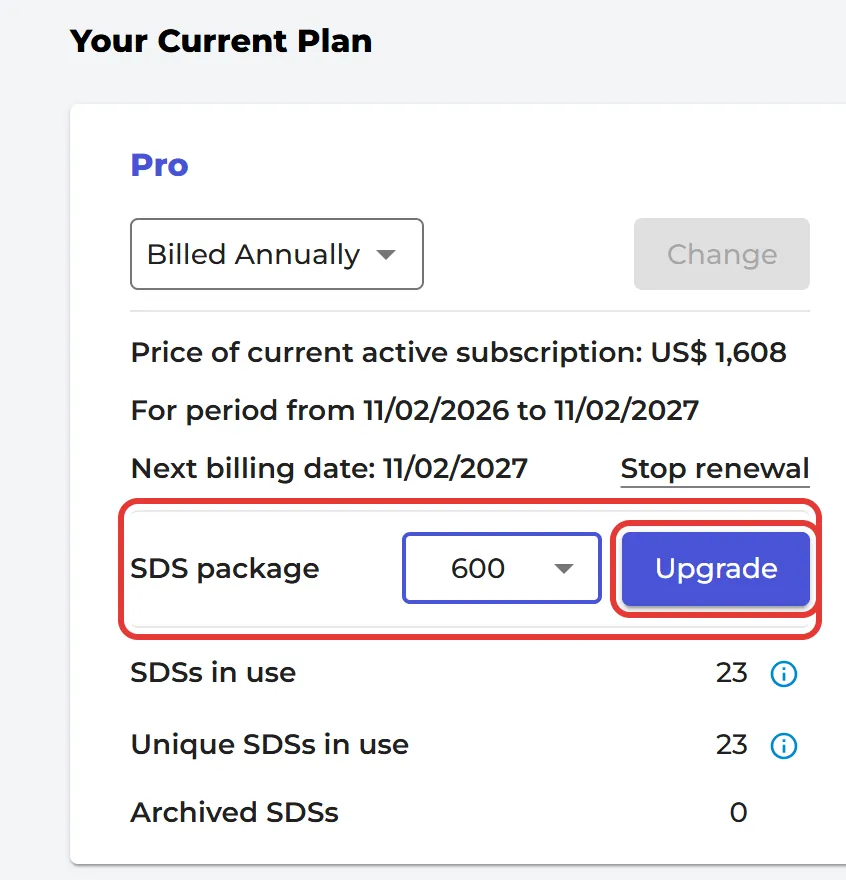
- Under Your Current Plan, choose the new number of SDSs in SDS package and click Upgrade.
- Check the billing details and the price, click Review order and pay.
You only pay the difference for the rest of the current period. Read more: Can I change the number of SDS in our subscription later?
How SDSs are counted
The limit counts the active SDSs in your library, once per location: an SDS used on three locations counts three times. SDSs in the archive do not count. The Billing Page shows SDSs in use, Unique SDSs in use and Archived SDSs.
Organizations with many sites that use the same SDSs can ask us for a custom price. During the free trial you can change the plan at no cost: Can I change our subscription plan during the trial period?