

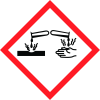
Note: Ingredients listed on restricted chemical lists
EC/CAS
215-185-5/1310-73-2
Name of the chemical
sodium hydroxide
Concentration
25%
General Information
Version
5
Revision date
2024-06-24
Product name
WATERMARK CAUSTIC 25% 1.2: Relevant Identified use of substance/mixture and uses advised against
CAS No.
1310-73-2
Icons in SDS

Company Information
company name
Watermark Projects
e-mail address of the competent person responsible for the Safety Data Sheet
info@watermarkprojects.co.uk
GHS Information
Signal word
Danger
Hazard Codes
Hazard statements (CLP)
H290, H314
Hazard statements
Code
Statements
H290
May be corrosive to metals
Section 2
SECTION 2: Hazards identification
Signal word
Danger
Precautionary statements
P280 Wear protective gloves/protective clothing/eye protection/face protection. P310 Immediately call a POISON CENTER or doctor/physician. P301+P330+P331 IF SWALLOWED: rinse mouth. Do NOT induce vomiting. P303+P361+P353 IF ON SKIN (or hair): Remove immediately all contaminated clothing. Rinse skin with water/shower. 2.3: Other Hazards
2.1 Classification of the substance or mixture
Classification under CLP: H290 Met Corr 1 H314 Skin Corr 1A Additional Information


