


General Information
Version
7.1
Revision date
2022-02-11
Product name
Lithium nitrate PURIFIED
CAS No.
7790-69-4
REACH No
01-2119968667-16-XXXX
Emergency telephone
+44 (0) 1270 502894
Icons in SDS


Company Information
company name
VWR International Ltd
e-mail address of the competent person responsible for the Safety Data Sheet
SDS@avantorsciences.com
GHS Information
Signal word
Danger
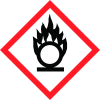
Hazard Codes
Hazard statements (CLP)
H272, H302, H319
Hazard statements
Code
Statements
H272
May intensify fire; oxidiser
Section 2
SECTION 2: Hazards identification
2.2 Label elements
2.2.1 Labelling
Hazard statements
H272 May intensify fire; oxidiser. H302 Harmful if swallowed. H319 Causes serious eye irritation.
Precautionary statements
P210 Keep away from heat, hot surfaces, sparks, open flames and other ignition sources. No smoking. P220 Keep/Store away from clothing/combustible materials. P280 Wear protective gloves/protective clothing/eye protection/face protection. P301+P330+P331 IF SWALLOWED: rinse mouth. Do NOT induce vomiting. P305+P351+P338 IF IN EYES: Rinse cautiously with water for several minutes. Remove contact lenses, if present and easy to do. Continue rinsing. P312 Call a POISON CENTER/doctor/…/if you feel unwell.
2.3 Other hazards
This substance does not meet the PBT/vPvB criteria of REACH, Annex XIII.



