

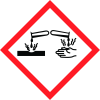
Note: Ingredients listed on restricted chemical lists
EC/CAS
7647-01-0
Name of the chemical
Hydrochloric acid
Concentration
N/A
General Information
Version
1.0
Revision date
2015-05-28
Product name
Hydrochloric acid 0.320N
Substance name
Hydrochloric acid (1 - < 10%)
CAS No.
7647-01-0
REACH No
Not
Emergency telephone
+1-610-728-2103, +1-800-424-9300, +1-613-996-6666
Icons in SDS

Company Information
company name
VWR Chemical Manufacturing LLC
e-mail address of the competent person responsible for the Safety Data Sheet
NAMSDS@vwr.com
GHS Information
Signal word
Warning
Hazard Codes
Hazard statements (CLP)
H290
Hazard statements
Code
Statements
H290
May be corrosive to metals
Section 2
SECTION 2: Hazards identification
Classification according to GHS
Hazard classes and hazard categories
Hazard statements
Substance or mixture corrosive to metals, category 1 H290 Classification according to H290 May be corrosive to metals.
2.2 Label elements
Labelling according GHS (67/548/EEC or 1999/45/EC)
Precautionary statements
P234 Keep only in original container. P390 Absorb spillage to prevent material damage. P406 Store in corrosive resistant container with a resistant inner liner.
Hazard pictograms
not applicable
R-phrase(s)
not applicable
S-phrase(s)
not applicable
2.3 Other hazards
SVHC No


