

Note: Ingredients listed on restricted chemical lists
EC/CAS
231-555-9/7632-00-0
Name of the chemical
Sodium nitrite
Concentration
≤100%
General Information
Revision date
2017-05-03
Product name
Sodium nitrite
CAS No.
7632-00-0
Emergency telephone
(866) 928-0789
Icons in SDS

Company Information
company name
Thermo Fisher Scientific Chemicals, Inc
e-mail address of the competent person responsible for the Safety Data Sheet
tech@alfa.com
GHS Information
Signal word
Danger
Section 2
SECTION 2: Hazards identification
2.3 Other hazards
No information known
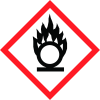
Hazard pictograms
GHS03 GHS06
Signal word
Danger
Hazard statements
H272 May intensify fire; oxidizer. H301 Toxic if swallowed. H330 Fatal if inhaled.
Precautionary statements
P221 Take any precaution to avoid mixing with combustibles. P210 Keep away from heat. - No smoking. P301+P310 IF SWALLOWED: Immediately call a POISON CENTER/ doctor. P320 Specific treatment is urgent (see on this label). P405 Store locked up. P501 Dispose of contents/container in accordance with local/regional/national/international regulations.
Classification system
HMIS ratings (scale 0-4) (Hazardous Materials Identification System) 2 Health (acute effects) = 2 HEALTH 0 Flammability = 0 FIRE REACTIVITY 2 Physical Hazard = 2
PBT Substances
Not applicable
vPvB Substances
Not applicable


