



General Information
Revision date
2017-03-30
Product name
CALUMET 420-460
Product Synonyms
None
CAS No.
64742-47-8
1.2.1 Relevant identified uses
Petrochemical industry, Solvent
Emergency telephone
1-800-424-9300 (USA
Icons in SDS

Company Information
company name
SolvChem, Inc
GHS Information
Signal word
Danger
Hazard Codes
Hazard statements (CLP)
H200, H227, H300, H304
Hazard statements
Code
Statements
H200
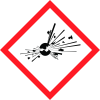
Unstable Explosive
Section 2
SECTION 2: Hazards identification
DANGER!!
Hazard statements
CAT = Hazard Category) H200s) PHYSICAL Flammable Liquids(CAT 2) H227 COMBUSTIBLE LIQUID. H300s) HEALTH
Aspiration hazard
CAT 1) H304 MAY BE FATAL IF SWALLOWED AND ENTERS AIRWAYS.
Prevention
STRICT HYGIENE! AVOID EXPOSURE OF (PREGNANT) WOMEN! P100s = General, P200s = Prevention, P300s = Response, P400s = Storage, P500s = Disposal P210 Keep away from heat, hot surfaces, sparks, open flames, and other ignition sources. No smoking. P280 Wear protective gloves/protective clothing/eye protection/face protection. P301+310 IF SWALLOWED: Immediately call a POISON CENTER or physician. P331 Do NOT induce vomiting. P403+235 Store in a well-ventilated place. Keep cool. P405 Store locked up. P501 Dispose of contents/container according to: local/regional/national/international regulations. SEE SECTIONS 8, 11 & 12 FOR TOXICOLOGICAL INFORMATION.



