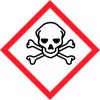
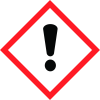
General Information
Version
6.3
Revision date
2022-10-29
Product name
Oxazole yellow
CAS No.
152068-09-2
Emergency telephone
800-424-9300, +1-703- 527-3887
Icons in SDS


Company Information
company name
Sigma-Aldrich Inc
GHS Information
Signal word
Danger
Hazard Codes
Hazard statements (CLP)
H301, H315, H319
Hazard statements
Code
Statements
H301
Toxic if swallowed
Section 2
SECTION 2: Hazards identification
Signal word
Danger
Hazard statements
H301 Toxic if swallowed. H315 Causes skin irritation. H319 Causes serious eye irritation.
Precautionary statements
P264 Wash skin thoroughly after handling. P270 Do not eat, drink or smoke when using this product. P280 Wear protective gloves/ eye protection/ face protection. P301 + P310 + P330 IF SWALLOWED: Immediately call a POISON CENTER/ doctor. Rinse mouth. P302 + P352 IF ON SKIN: Wash with plenty of soap and water. P305 + P351 + P338 IF IN EYES: Rinse cautiously with water for several minutes. Remove contact lenses, if present and easy to do. Continue rinsing. P332 + P313 If skin irritation occurs: Get medical advice/ attention. P337 + P313 If eye irritation persists: Get medical advice/ attention. P362 Take off contaminated clothing and wash before reuse. P405 Store locked up. P501 Dispose of contents/ container to an approved waste disposal plant.
2.3 Other hazards
none