

Note: Ingredients listed on restricted chemical lists
EC/CAS
1310-73-2
Name of the chemical
sodium hydroxide
Concentration
4.8
EC/CAS
7758-99-8
Name of the chemical
Copper sulphate pentahydrate
Concentration
1.8
General Information
Revision date
2018-04-04
Product name
Atellica CH Total Protein II (TP)
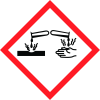
Icons in SDS


Company Information
company name
Siemens Healthcare Diagnostics Inc
GHS Information
Signal word
Danger
Hazard Codes
Hazard statements (CLP)
H290, H314
Hazard statements
Code
Statements
H290
May be corrosive to metals
Section 2
Additional information
Not available.
Signal word
TP R1 Reagent Danger TP R2 Reagent Danger
Hazard statements
TP R1 Reagent H290 - May be corrosive to metals. H314 - Causes severe skin burns and eye damage. TP R2 Reagent H290 - May be corrosive to metals. H314 - Causes severe skin burns and eye damage.
Prevention
TP R1 Reagent P280 - Wear protective gloves/protective clothing/eye protection/face protection. P234 - Keep only in original container. P264 - Wash hands thoroughly after handling. TP R2 Reagent P280 - Wear protective gloves/protective clothing/eye protection/face protection. P234 - Keep only in original container. P264 - Wash hands thoroughly after handling.
Response
TP R1 Reagent P390 - Absorb spillage to prevent material damage. P304 + P340 + P310 - IF INHALED: Remove person to fresh air and keep comfortable for breathing. Immediately call a POISON CENTER or physician. P301 + P310 + P330 + P331 - IF SWALLOWED: Immediately call a POISON CENTER or physician. Rinse mouth. Do NOT induce vomiting. P303 + P361 + P353 + P363 + P310 - IF ON SKIN (or hair): Take off immediately all contaminated clothing. Rinse skin with water or shower. Wash contaminated clothing before reuse. Immediately call a POISON CENTER or physician. P305 + P351 + P338 + P310 - IF IN EYES: Rinse cautiously with water for several minutes. Remove contact lenses, if present and easy to do. Continue rinsing. Immediately call a POISON CENTER or physician. TP R2 Reagent P390 - Absorb spillage to prevent material damage. P304 + P340 + P310 - IF INHALED: Remove person to fresh air and keep comfortable for breathing. Immediately call a POISON CENTER or physician. P301 + P310 + P330 + P331 - IF SWALLOWED: Immediately call a POISON CENTER or physician. Rinse mouth. Do NOT induce vomiting. P303 + P361 + P353 + P363 + P310 - IF ON SKIN (or hair): Take off immediately all contaminated clothing. Rinse skin with water or shower. Wash contaminated clothing before reuse. Immediately call a POISON CENTER or physician. P305 + P351 + P338 + P310 - IF IN EYES: Rinse cautiously with water for several minutes. Remove contact lenses, if present and easy to do. Continue rinsing. Immediately call a POISON CENTER or physician.
Storage
TP R1 Reagent Not applicable. TP R2 Reagent Not applicable.
Disposal
TP R1 Reagent P501 - Dispose of contents and container in accordance with all local, regional, and national regulations. TP R2 Reagent P501 - Dispose of contents and container in accordance with all local, regional, and national regulations.
Supplemental label elements
TP R1 Reagent None known. elements TP R2 Reagent None known. Hazards not otherwise : TP R1 Reagent None known. classified TP R2 Reagent None known.


