

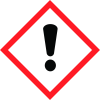
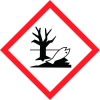
General Information
Revision date
2015-05-15
Product name
LIAL 111A Alcohol
Product Synonyms
Monobranched and linear alcohol
CAS No.
128973-77-3
1.2.1 Relevant identified uses
Raw material for chemical processes, Industrial use
Icons in SDS


Company Information
company name
Sasol Chemicals (USA) LLC
e-mail address of the competent person responsible for the Safety Data Sheet
SasolElectronicSDS@us.sasol.com
GHS Information
Signal word
Warning
Hazard Codes
Hazard statements (CLP)
H319, H400, H411
Hazard statements
Code
Statements
H319
Causes serious eye irritation
Section 2
Hazard statements
Eye irritation Category 2A Acute aquatic toxicity Category 1 Chronic aquatic toxicity Category 2 H319 Causes serious eye irritation H400 Very toxic to aquatic life. H411 Toxic to aquatic life with long lasting effects.
Signal word
Warning
Prevention
P264 Wash skin thoroughly after handling P280 Wear eye protection/ face protection. P273 Avoid release to the environment.
Response
P305 + P351 + P338 IF IN EYES Rinse cautiously with water for several minutes Remove contact lenses, if present and easy to do. Continue rinsing. P337 + P313 If eye irritation persists: Get medical advice/ attention. P391 Collect spillage.
Disposal
P501 Dispose of contents/ container to an approved waste disposal plant


