

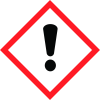
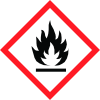
Note: Ingredients listed on restricted chemical lists
General Information
Revision date
2025-05-01
Product name
Manufactured for Rosco Laboratories Inc
CAS No.
64-17-5
Emergency telephone
(203) 708 8900
Icons in SDS


Company Information
company name
Rosco Laboratories Inc
GHS Information
Signal word
Warning
Section 2
SECTION 2: Hazards identification
OSHA Hazardous Components (Specific Other Limits Chemical Identity;
HMIS® ratings
Health 1, Flammability 2, Reactivity 0
Principle Routes of Exposure
Eye contact, Skin Contact, Ingestion, Inhalation
Health hazards
(Acute and Chronic)
Hazard statements
H302: Harmful if swallowed H315+H320: Causes skin and eye irritation H335: May cause respiratory irritation H226: Flammable liquid and vapor
Precautionary statements
P305+351+338 IF IN EYES Rinse cautiously with water for several minutes. Remove contact lenses if present and easy to do – continue rinsing. P302+352 IF ON SKIN Wash with plenty of water P304+340 IF INHALED Remove person to fresh air and keep comfortable for breathing P315: Get immediate medical advice/attention. 1 (Continued) Signs and Symptoms of Exposure None known
Medical Conditions Generally Aggravated by Exposure
None known


