

Note: Ingredients listed on restricted chemical lists
General Information
Version
According to Work, Health and Safety Regulations (WHS) and Australian Dangerous Goods Code (ADG) regulations
Revision date
2023-06-27
Product name
Fairy AutoDish Tab All In One Original
Product Synonyms
C-90316293-005
supplier name
Procter & Gamble Australia Pty Ltd
Emergency telephone
001-800-424-9300, 011-703-527-3887, +(61)-290372994, +(64)-98010034
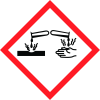
Icons in SDS

Company Information
company name
Procter & Gamble Australia Pty Ltd
GHS Information
Signal word
DANGER
Section 2
SECTION 2: Hazards identification
GHS Classification Classification and procedure used to derive the classification for mixtures according to National Guide on Classifying Hazardous Chemicals (July 2020) (UN GHS 7th revised edition)
2.1 Classification of the substance or mixture
Serious eye damage/eye irritation Category 1
2.2 Label elements
Corrosion
Signal word
DANGER
Hazard statements
Causes serious eye damage
Prevention
Wear eye/face protection
Response
IF IN EYES: Rinse cautiously with water for several minutes. Remove contact lenses, if present and easy to do. Continue rinsing Immediately call a doctor
Other hazards which do not result in classification
May form combustible dust concentrations in air.


