

Note: Ingredients listed on restricted chemical lists
EC/CAS
231-783-9/7727-37-9
Name of the chemical
Nitrogen N2
Concentration
100%
General Information
Revision date
2013-01-23
Product name
Nitrogen Lasercuttingnitrogen 4.6, Lasernitrogen 5.0
Product Synonyms
Nitrogen
Chemical name
Nitrogen
CAS No.
7727-37-9
Emergency telephone
Myrkytystietokeskus (Finnish Poison Center):+ 358 9 471977 (24 h) or + 358 9 4711 (24 h
Icons in SDS


Company Information
company name
Oy AGA Ab
e-mail address of the competent person responsible for the Safety Data Sheet
info@fi.aga.com
GHS Information
Signal word
Warning
Hazard Codes
Hazard statements (CLP)
H280
Hazard statements
Code
Statements
H280
Contains gas under pressure; may explode if heated
Section 2
SECTION 2: Hazards identification
2.1 Classification of the substance or mixture
Hazard Class and Category Code Regulation EC
Physical hazards
Gases under pressure - Compressed gas - Warning - (CLP : Press. Gas) - H280 Classification EC 67/548 or EC
2.2 Label elements
Labelling Regulation EC
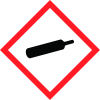
Hazard pictograms
M « : GHS04
Signal word
Warning
Hazard statements
H280 - Contains gas under pressure; may explode if heated.
Storage
P403 - Store in a well-ventilated place.
2.3 Other hazards
Asphyxiant in high concentrations.



