



General Information
Revision date
2016-08-04
Product name
EDTA tetrasodium salt hydrate
CAS No.
194491-31-1
1.2.1 Relevant identified uses
For R&D use only
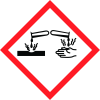
Icons in SDS


Company Information
company name
Oakwood Products, Inc
GHS Information
Signal word
Danger
Hazard Codes
Hazard statements (CLP)
H302, H318, H351
Hazard statements
Code
Statements
H302
Harmful if swallowed
Section 2
SECTION 2: Hazards identification
2.1 Classification of the substance or mixture
Acute toxicity, oral (Category 4) Serious eye damage/eye irritation (Category 1) Carcinogenicity (Category 2)
2.2 Label elements
POD
Signal word
Danger
Hazard statements
H302 Harmful if swallowed H318 Causes serious eye damage H351 Suspected of causing cancer
Precautionary statements
P201 Obtain special instructions before use. P202 Do not handle until all safety precautions have been read and understood. P280 Wear protective gloves/protective clothing/eye protection/face protection. P301 + P312 IF SWALLOWED: call a POISON CENTER or doctor/physician IF you feel unwell. P305 + P351 + P338 IF IN EYES: Rinse cautiously with water for several minutes. Remove contact lenses, if present and easy to do. Continue rinsing. EDTA tetrasodium salt hydrate Page 1 of 6 P312 Call a POISON CENTER or doctor/physician if you feel unwell.


