

General Information
Revision date
2019-01-04
Product name
Terbazine 875 WG Herbicide
Substance name
Terbazine 875 WG Herbicide
CAS No.
5915-41-3
1.2.1 Relevant identified uses
for Use table on the label
Icons in SDS


Company Information
company name
NUFARM AUSTRALIA LIMITED
GHS Information
Signal word
Warning
Hazard Codes
Hazard statements (CLP)
H302, H400
Hazard statements
Code
Statements
H302
Harmful if swallowed
Section 2
2.1 Classification of the substance or mixture
OT4 Acute Toxicity - Oral: Category 4 the AC1 Hazardous to the Aquatic Environment - Long-Term Hazard: Category 1 substance/mixture AA1 Hazardous to the Aquatic Environment - Acute Hazard: Category 1
Signal word
WARNING
Hazard statements
H302 Harmful if swallowed H400 Very toxic to aquatic life. General P101 If medical advice is needed, have product container or label at hand.
Precautionary statements
P102 Keep out of reach of children. P103 Read label before use.
Hazard pictograms
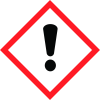
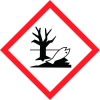
Exclamation mark, Environment, The below pictograms are GHS Hazard symbols for workplace use only. See SECTION 14 for Dangerous Goods information.
Prevention
P264 Wash hands and exposed skin thoroughly after handling. P270 Do not eat, drink or smoke when using this product.
Response
P301+P312 IF SWALLOWED: Call a POISON CENTER or doctor/physician if you feel unwell. P330 Rinse mouth.
Further information
Poisons Schedule S6


