

General Information
Revision date
2020-02-01
Product name
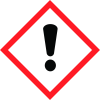
Personal Protective Equipment GHS Pictogram(s) HMIS DOT Symbol(s) Irritant Non Regulated
1.2.1 Relevant identified uses
To the best of our knowledge, this Safety Data Sheet is prepared to comply with US OSHA 29 CFR1910.1200 and other governmental agencies both domestic and foreign. Hazard and precautionary statements arebased on maximum listed concentrations of each hazardous ingredient. Unlisted ingredients are not “hazardous” per the OSHA Hazard Communication Standard (29 CFR 1910.1200) and/or other governmentalagencies. 1919 Case Parkway
Emergency telephone
800-535-5053
Icons in SDS


Company Information
company name
KOOL LOOP 210
GHS Information
Signal word
Warning
Hazard Codes
Hazard statements (CLP)
H303, H316, H320
Hazard statements
Code
Statements
H303
May be harmful if swallowed
Section 2
SECTION 2: Hazards identification
GHS Classification EMERGENCY OVERVIEW
2.1 Classification of the substance or mixture
GHS Symbol(s)
Precautionary statements
P102-Keep out of reach of children. H303-May be harmful if swallowed GHS Label Elements H316-Causes mild skin irritation. H320-Causes eye irritation. "WARNING" P233-Keep container tightly closed. P262-Do not gets in eyes, on skin or on clothing. P264-Wash thoroughly after handling. P281-Use personal protective equipment as required.


