

General Information
Revision date
2017-07-24
Product name
LOCTITE SF 7840 known as LOCTITE NATURAL BLUE BIODEGR
CAS No.
68131-39-5
supplier name
Henkel New Zealand Ltd
Emergency telephone
NUMBER 0800 243 622
Icons in SDS

Company Information
company name
Henkel New Zealand Ltd
GHS Information
Signal word
Danger
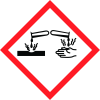
Hazard Codes
Hazard statements (CLP)
H318, H401
Hazard statements
Code
Statements
H318
Causes serious eye damage.
H401
Toxic to aquatic life
Section 2
HSNO Classifications
8.3A Class 8 - Corrosiveness, Subclass 8.3 - Eye corrosive, Hazard Classification A Class 9 - Ecotoxicity, Subclass 9.1 - Aquatic, Hazard Classification D
Hazard categories
Serious eye damage/eye irritation Category 1 Acute hazards to the aquatic Category 2
Signal word
Danger
Hazard statements
H318 Causes serious eye damage. H401 Toxic to aquatic life.
Prevention
P273 Avoid release to the environment. P280 Wear eye protection/face protection.
Response
P305+P351+P338+P315 IF IN EYES: Rinse cautiously with water for several minutes. Remove contact lenses, if present and easy to do. Continue rinsing. Get immediate medical advice/attention.
Disposal
P501 Dispose of contents/container to an appropriate treatment and disposal facility in accordance with applicable laws and regulations.


