

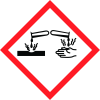
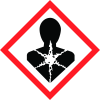
Note: Ingredients listed on restricted chemical lists
EC/CAS
7553-56-2
Name of the chemical
Iodine (I)
Concentration
10-30 %
General Information
Product name
Starch Iodine Premix
1.2.1 Relevant identified uses
Reagent to test apple maturity
supplier name
Grochem (AgriNova New Zealand Limited)
Emergency telephone
+64 4 237 0905, +64 4 237 0906, +64 4 917 9888
Icons in SDS


Company Information
company name
Grochem (AgriNova New Zealand Limited)
e-mail address of the competent person responsible for the Safety Data Sheet
grochem@grochem.com
GHS Information
Signal word
Danger
Hazard Codes
Hazard statements (CLP)
H314, H317, H373, H411
Hazard statements
Code
Statements
H314
Causes severe skin burns and eye damage.
H317
May cause an allergic skin reaction
H373
May cause damage to organs through prolonged or repeated exposure
H411
Toxic to aquatic life with long lasting effects
Section 2
SECTION 2: Hazards identification
This material is hazardous according to the criteria of EPA New Zealand GHS 7. HSNO Approval Code HSR002491 - Additives, Process Chemicals and Raw Materials (Corrosive) Group Standard 2020
Signal word
Danger
2.1 Classification of the substance or mixture
Skin Corrosion/Irritation - Category 1C Serious Eye Damage/Irritation - Category 1 Sensitisation - Skin - Category 1 Specific Target Organ Toxicity following Repeated Exposure - Category 2 Long Term Hazards to the Aquatic Environment - Category 2
Hazard statements
H314 - Causes severe skin burns and eye damage. H317 - May cause an allergic skin reaction. H373 - May cause damage to organs through prolonged or repeated exposure. H411 - Toxic to aquatic life with long lasting effects.
Prevention
P102 - Keep out of reach of children. P103 - Read carefully and follow all instructions. P260 - Do not breathe dust, fume, gas, mist, vapours or spray. P264 - Wash hands, face and all exposed skin thoroughly after handling. P272 - Contaminated work clothing should not be allowed out of the workplace. P273 - Avoid release to the environment. P280 - Wear protective gloves/protective clothing including eye/face protection.
Response
P101 - If medical advice is needed, have product container or label at hand. P301+P330+P331 - IF SWALLOWED: Rinse mouth. Do NOT induce vomiting. P303+P361+P353 - IF ON SKIN (or hair): Take off immediately all contaminated clothing. Rinse skin with water [or shower]. P304+P340 - IF INHALED: Remove person to fresh air and keep comfortable for breathing. P305+P351+P338 - IF IN EYES: Rinse cautiously with water for several minutes. Remove contact lenses, if present and easy to do. Continue rinsing. P310 - Immediately call a POISON CENTER/doctor/insert appropriate source of emergency medical advice. P333+P313 - If skin irritation or rash occurs: Get medical advice/attention. P363 - Wash contaminated clothing before reuse. P391 - Collect spillage.
Storage
P405 - Store locked up.
Precautionary statements
P501 - Dispose of contents/container in accordance with local, regional, national and international regulations.
Classifications
Classified as Dangerous Goods by the criteria of the “Australian Code for the Transport of Dangerous Goods by Road & Rail” and the “New Zealand NZS5433: Transport of Dangerous Goods on Land”. Dangerous Goods Class 8


