



Note: Ingredients listed on restricted chemical lists
EC/CAS
110-54-3
Name of the chemical
Hexane
Concentration
15-30%
General Information
Revision date
2026-06-30
Product name
CANTAC HSE-TAC (canisters and aerosol cans)
1.2.1 Relevant identified uses
Adhesive for industrial use
Icons in SDS


Company Information
company name
Glue Guru
e-mail address of the competent person responsible for the Safety Data Sheet
enquiries@glueguru.com.au
GHS Information
Signal word
DANGER
Hazard Codes
Hazard statements (CLP)
H220, H221, H222, H316, H320, H411
Hazard statements
Code
Statements
H220
Extremely flammable gas
Section 2
SECTION 2: Hazards identification
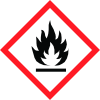
Hazard pictograms
Flammable Gas Irritant Ecotoxic Product Name: CANTAC HSE- Issued by: Glue Guru Tac Date of MSDS: 30 June 2021 Tel: 64 9 444 4878
Signal word
DANGER HSNO Class Hazard Hazard Statement
Hazard categories
Code 2.1.1A H220 Extremely Flammable Gas (canister) Category 1 2.1.2A H222 Extremely flammable (aerosol) Category 1 6.3B H316 May cause skin irritation Category 3 6.4A H320 Causes eye irritation Category 2A 9.1B H411 Toxic to aquatic life with long lasting Category 2 effects Prevention Code Prevention Statement P103 Read label before use P104 Read safety data sheet before use P210 Keep away from sparks and open flames. No smoking P211 Do not spray on an open flame or other ignition source P264 Wash hands after handling P273 Avoid release to the environment P280 Wear protective clothing and gloves Response Code Response Statement P362 Take off contaminated clothing and wash before re-use P391 Collect spillage P305 + IF IN EYES: Rinse cautiously with water for several minutes. Remove P351+P338 contact lenses, if present and easy to do. Continue rinsing P332 + P313 If skin irritation occurs: Get medical advice/ attention P304 +P340 If Inhaled: Remove to fresh air and keep at rest in a position comfortable for breathing Storage Code Storage Statement P410 + P412 Protect from sunlight. Do not expose to temperatures exceeding 50 °C Disposal Code
Disposal
P501 Dispose of according to the local authorities Composition of hazardous Ingredients Ingredients Wt% CAS NUMBER. N Hexane 15-30% 110-54-3 Dimethyl Ether 15-30% 115-10-6 Routes of Exposure
2.1 Classification of the substance or mixture
Hazard Hazard Statement GHS Category Code 2.1.1A H220 Extremely Flammable Gas (canister) Category 1 2.1.2A H222 Extremely flammable (aerosol) Category 1 6.3B H316 May cause skin irritation. Category 3 6.4A H320 Causes eye irritation. Category 2A 9.1B H411 Toxic to aquatic life with long lasting Category 2 effects. Prevention Code Prevention Statement P103 Read label before use. P104 Read safety data sheet before use. P210 Keep away from sparks and open flames. No smoking. P211 Do not spray on an open flame or other ignition source. P264 Wash hands after handling. P273 Avoid release to the environment. P280 Wear protective clothing and gloves. Response Code Response Statement P362 Take off contaminated clothing and wash before re-use P391 Collect spillage. P305 + IF IN EYES: Rinse cautiously with water for several minutes. Remove P351+P338 contact lenses, if present and easy to do. Continue rinsing. P332 + P313 If skin irritation occurs: Get medical advice/ attention. P304 +P340 If Inhaled: Remove to fresh air and keep at rest in a position comfortable for breathing. Storage Code Storage Statement P410 + P412 Protect from sunlight. Do not expose to temperatures exceeding 50 °C. Disposal Code


