



General Information
Revision date
2022-06-08
Product name
Idenfier
Icons in SDS


Company Information
company name
Evergreen Garden Care Australia Pty. Ltd
GHS Information
Signal word
WARNING
Hazard Codes
Hazard statements (CLP)
H272, H319, H373, H412
Hazard statements
Code
Statements
H272
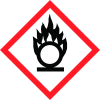
May intensify fire; oxidiser
Section 2
Signal word
WARNING
Hazard statements
H272 May intensify fire; oxidiser. H319 Causes serious eye irritaon. H373 May cause damage to organs through prolonged or repeated exposure by ingeson and inhalaon. H412 Harmful to aquac life with long lasng effects.
Hazard pictograms
Flame over circle,Exclamaon mark,Health hazard Precauonary Statement – Prevenon SDS P210 Keep away from heat, hot surfaces, sparks, open flames and other ignition sources. No smoking. P220 Keep away from clothing and other combustible materials. P260 Do not breathe dust/fume/gas/mist/vapours/spray. P264 Wash skin thoroughly after handling. P280 Wear protective gloves/protective clothing/eye protection/face protection. P273 Avoid release to the environment.
Response
P305+P351+P338 IF IN EYES: Rinse cautiously with water for several minutes. Remove contact lenses, if present and easy to do. Continue rinsing. P337+P313 If eye irritation persists: Get medical advice/attention. P314 Get medical advice/attention if you feel unwell. P370+P378 In case of fire: Use water to extinguish.
Precautionary statements
Disposal P501 Dispose of contents/container to an approved waste disposal plant.



