

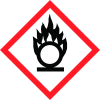

Note: Ingredients listed on restricted chemical lists
General Information
Revision date
2015-02-10
Product name
CLEENOL TANNIN REMOVER
supplier name
Cleenol Group Ltd
Icons in SDS
Company Information
company name
Cleenol Group Ltd
e-mail address of the competent person responsible for the Safety Data Sheet
sales@cleenol.co.uk
GHS Information
Signal word
Danger
Hazard Codes
Hazard statements (CLP)
H272, H302, H315+H319, H412
Hazard statements
Code
Statements
H272
May intensify fire; oxidiser
Section 2
CLP CLASSIFICATION
H315/H319 H412
2.2 Label elements
Labels in Accordance with (EC) No 1272/2008
Hazard statements
H315 / H319 Causes skin irritation/causes serious eye irritation H302 Harmful if swallowed H272 May intensify fire, oxidiser.
Precautionary statements
P262 Do not get in eyes, on skin, or on clothing P270 Do not eat, drink or smoke when using this product. P305 / P351 / P338 If in eyes rinse cautiously with water for several minutes Remove contact lenses, if present and easy to do. Continue rinsing P102 Keep out of reach of children. P301 / P330 / P331 If swallowed rinse mouth do not induce vomiting P232 Protect from moisture
2.3 Other hazards
Not Classified as PBT/vPvB by current EU Criteria 1



