

General Information
Revision date
2012-08-30
Product name
PICOLINAFEN TECHNICAL
Substance name
Report
1.2.1 Relevant identified uses
crop protection active ingredient
Emergency telephone
+49 180 2273-112
Icons in SDS


Company Information
company name
BASF SE
e-mail address of the competent person responsible for the Safety Data Sheet
Produktinformation-Pflanzenschutz@basf.com
GHS Information
Signal word
Warning
Section 2
SECTION 2: Hazards identification
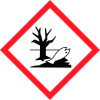
Hazard pictograms
Annex II, Document M 30 August 2012 Page 3.7 / 2 N Dangerous for the environment.
Signal word
Warning
Hazard statements
H400 Very toxic to aquatic life. H410 Very toxic to aquatic life with long lasting effects.
Prevention
P273 Avoid release to the environment.
Response
P391 Collect spillage.
Precautionary statements
(Disposal) P501 Dispose of contents/container to hazardous or special waste collection point.
R-phrase(s)
R50/53 Very toxic to aquatic organisms, may cause long-term adverse effects in the aquatic environment.
S-phrase(s)
S61 Avoid release to the environment. Refer to special instructions/safety data sheets.
Hazardous Ingredients
for labelling PICOLINAFEN
2.3 Other hazards
Assessment PBT / vPvB: Not fulfilling PBT (persistent/bioaccumulative/toxic) criteria.. Not fulfilling vPvB (very persistent/very bioaccummulative) criteria.. Annex II, Document M 30 August 2012 Page 3.7 / 3



