

General Information
Revision date
2022-07-08
Product name
Benzyl Phenyl Acetate Natural (Manufacturing)
CAS No.
102-16-9
1.2.1 Relevant identified uses
Flavorings
Emergency telephone
1-800-535-5053, 1-352-323-3500
Icons in SDS

Company Information
company name
Aurochemicals
GHS Information
Signal word
Warning
Hazard Codes
Hazard statements (CLP)
H400, H410
Hazard statements
Code
Statements
H400
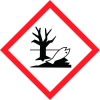
Very toxic to aquatic life
Section 2
SECTION 2: Hazards identification
GHS Classification in Accordance with 29 CFR 1910 (OSHA HCS): 2.1
Hazard pictograms
Signal Statement Warning
Hazard statements
H400 Very toxic to aquatic life H410 Very toxic to aquatic life with long lasting effects.
Precautionary statements
P273 Avoid release to the environment P280 Wear protective gloves/ eye protection/ face protection. P302 + P352 IF ON SKIN: Wash with plenty of soap and water. P305 + P351 + IF IN EYES: Rinse cautiously with water for several minutes. Remove P338 contact lenses, if present and easy to do. Continue rinsing. P312 Call a POISON CENTER/doctor if you feel unwell. P391 Collect spillage P403 + P233 Store in a well-ventilated place. Keep container tightly closed. P501 Dispose of contents/ container to an approved waste disposal plant. 2.3 HNOC (Hazards not otherwise None classified or not covered by GHS


