

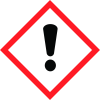
Note: Ingredients listed on restricted chemical lists
EC/CAS
77-93-0
Name of the chemical
citric acid, triethyl ester
Concentration
N/A
General Information
Revision date
2019-03-01
Product name
2,6-Nonadienol 1% in TEC, Natural
CAS No.
77-93-0
1.2.1 Relevant identified uses
Flavorings 1.3
Emergency telephone
1-800-535-5053
Icons in SDS
Company Information
company name
Aurochemicals
GHS Information
Signal word
Warning
Hazard Codes
Hazard statements (CLP)
H315
Hazard statements
Code
Statements
H315
Causes skin irritation
Section 2
OSHA HCS Classification
Skin irritation (Category 2), H315 For the full text of the H-Statements mentioned in this Section, see Section 16.
Hazard pictograms
Signal Statement Warning
Hazard statements
H315 Causes skin corrosion/irritation. Category 2
Precautionary statements
P264 Wash thoroughly after handling. P280 Wear protective gloves. P302+P352 IF ON SKIN: Wash with plenty of water. P305+P351+P338 IF IN EYES: Rinse cautiously with water for several minutes. Remove contact lenses, if present and easy to do. Continue P332+P313 rinsing. If skin irritation occurs: Get medical advice /attention. P337+P313 If eye irritation persists: Get medical advice/attention. P362+P364 Take off contaminated clothing and wash it before reuse. 2.3 HNOC (Hazards not otherwise None classified or not covered by GHS


