

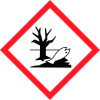
Note: Ingredients listed on restricted chemical lists
General Information
Revision date
2025-10-02
Product name
Jexa
1.2.2. Uses advised against
Any use other than specified above Reasons Why Uses Advised Against: Not determined or not applicable
Manufacturer Name
Atticus, LLC
Emergency telephone
1-800-424-9300, +1-703-527-3887, 1-844-685-9173
Icons in SDS

Company Information
company name
Atticus, LLC
GHS Information
Signal word
Warning
Hazard Codes
Hazard statements (CLP)
H320, H411
Hazard statements
Code
Statements
H320
Causes eye irritation
Section 2
Hazard statements
Comb. dust May form combustible dust concentrations in air. Jexa H320 Causes eye irritation H411 Toxic to aquatic life with long lasting effects
Precautionary statements
P264 Wash any exposed skin thoroughly after handling. P273 Avoid release to the environment P305+P351+P338 IF IN EYES: Rinse cautiously with water for several minutes. Remove contact lenses, if present and easy to do. Continue rinsing P337+P313 If eye irritation persists: Get medical advice or attention. P391 Collect spillage P501 Dispose of contents and container in accordance with federal, state and local regulations.
SECTION 2: Hazards identification
Not Otherwise Classified None
2.1 Classification of the substance or mixture
Eye irritation, category 2B Chronic aquatic hazard, category 2 Combustible Dust



