


Note: Ingredients listed on restricted chemical lists
EC/CAS
75-37-6
Name of the chemical
1,1-Difluoroethane
Concentration
N/A
General Information
Revision date
2019-04-01
Product name
UMR Mold Release
Manufacturer Name
Alumilite
Emergency telephone
800-424-9300 or
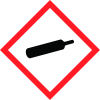
Icons in SDS


Company Information
company name
Alumilite
e-mail address of the competent person responsible for the Safety Data Sheet
info@alumilite.com
GHS Information
Signal word
Warning
Hazard Codes
Hazard statements (CLP)
H223, H280
Hazard statements
Code
Statements
H223
Flammable aerosol
Section 2
2.1 Classification of the substance or mixture
Flammable Aerosol Category 2 Gases Under Pressure – Liquefied gas
2.2 Label elements
Warning
Hazard statements
H223 Flammable aerosol. H280 Contains gas under pressure; may explode if heated.
Precautionary statements
P210 Keep away from heat, sparks, open flames and hot surfaces. No smoking. P211 Do not spray on an open flame or other ignition source. P251 Pressurized container: Do not pierce or burn, even after reuse. P377 Leaking gas fire: Do not extinguish, unless leak can be stopped safely. P381 Eliminate all ignition sources if safe to do so. P410+403+412 Protect from sunlight. Store in a well-ventilated place. Do not expose to temperatures exceeding 50°C/122°F.
Additional information
Avoid breathing aerosol spray. Use in a well-ventilated area and wear a dust mask.



