

General Information
Version
18.00
Revision date
2026-05-19
Product name
3M Glycidyl Azide Polymer GAP-0700
CAS No.
179392-99-5
1.2.1 Relevant identified uses
Binder
supplier name
3M
Manufacturer Name
3M
Emergency telephone
1-800-364-3577, (651) 737-6501
Icons in SDS


Company Information
company name
3M
Hazard Codes
Hazard statements (CLP)
H203
Hazard statements
Code
Statements
H203
Explosive; fire, blast or projection hazard
Section 2
SECTION 2: Hazards identification
Hazard classification Explosive: Division 1.3
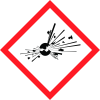
Hazard pictograms
Exploding bomb |
Hazard statements
Explosive; fire, blast or projection hazard.
Prevention
Keep away from heat, hot surfaces, sparks, open flames and other ignition sources. No smoking. Keep wetted with water. Keep only in original packaging. Ground and bond container and receiving equipment. Do not subject to grinding, shock or friction. Wear eye and face protection.
Response
In case of fire: Explosion risk. Evacuate area. DO NOT fight fire when fire reaches explosives.
Storage
Store in accordance with applicable local, regional, national, and international regulations.
Disposal
Refer to manufacturer, importer, or distributor for information on disposal, recovery or recycling.
2.1 Classification of the substance or mixture
Explosive: Division 1.3.



