


General Information
Product name
(3-(Trifluoromethyl)pyridin-4-yl)methanolSynthonix, Inc
CAS No.
1227598-69-7
Emergency telephone
1-800-424-9300, 1-703-527-3887
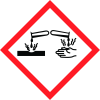
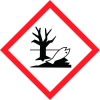
Icons in SDS


Company Information
company name
3-(Trifluoromethyl)pyridin-4-yl)methanolSynthonix, Inc
GHS Information
Signal word
Danger Skin corrosion/irritation (Category 1A, 1B, 1C) - H314 Hazardous to the aquatic environment, long-term hazard (Category 1) - H410
Section 2
SECTION 2: Hazards identification
Signal word
Danger Skin corrosion/irritation (Category 1A, 1B, 1C) - H314 Hazardous to the aquatic environment, long-term hazard (Category 1) - H410
Hazard statements
H314 - Causes severe skin burns and eye damage H410 - Very toxic to aquatic life with long-lasting effects
Precautionary statements
P210 - Keep away from heat, hot surfaces, sparks, open flames and other ignition sources. No smoking. P220 - Keep/Store away from clothing/combustible materials. P260 - Do not breathe dust/fumes/gas/mist/vapours/spray. P264 - Wash hands thoroughly after handling. P273 - Avoid release to the environment. P280 - Wear protective gloves/protective clothing/eye protection/face protection. P301+P330+P331 - IF SWALLOWED: Rinse mouth. Do NOT induce vomiting. P304 + P340 IF INHALED Remove victim to fresh air and keep at rest in a position comfortable for breathing. P405 - Store locked up.


