

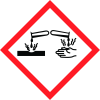
Note: Ingredients listed on restricted chemical lists
General Information
Version
1.1
Tarikh Semakan:
2015-08-25
A. Nama produk
Pellicon XL 50 with Biomax 30K C Screen
Kegunaan yang relevan
yang dikenal pasti bagi bahan atau campuran serta penggunaan yang tidak
Nombor kecemasan
Merck KGaA * 64271 Darmstadt *Germany* Telefon:+49 6151 72-0
Icons in SDS
Company Information
syarikat
Merck KGaA
e-mel
prodsafe@merckgroup.com
GHS Information
Signal word
Amaran
Hazard Codes
Hazard statements (CLP)
H290
Hazard statements
Code
Statements
H290
May be corrosive to metals
Section 2
2.1 Pengelasan ghs
Klasifikasi (PERATURAN (EC) Nombor 1272/2008) Menyebabkan kakisan logam, Kategori 1, H290 Untuk teks penuh Penyataan-H yang disebut dalam Seksyen ini, sila lihat Seksyen 16. Klasifikasi (67/548/EEC atau 1999/45/EC)Bersesuaian dengan Arahan-arahan EC atau undang-undang nasional masing-masing, produk ini tidak perlu dikelaskan ataupun dilabel.
2.2 Elemen label ghs, termasuklah penyataan pengawasan
Melabel (PERATURAN (EC) Nombor 1272/2008)
Kata isyarat amaran
Amaran
Penyataan bahaya
H290 Boleh mengakis logam.
2.3 Bahaya lain - tiada
Tiada yang diketahui.


